
MacroFactor Workouts review
Published November 12, 2026
MacroFactor Workouts is the workout app from the team behind the MacroFactor nutrition app: it builds a program from your goals, experience and gym, then adjusts weights and reps from the reps in reserve you log, for $11.99/month, $47.99 for six months or $71.99/year in the US after a 7-day trial, with no free tier. RIRLift does the same core job, weights set from your reps in reserve, for free and on Apple Watch, which MacroFactor Workouts doesn't support. MacroFactor Workouts is worth it if you already track food in MacroFactor ($89.99/year for both apps), train on Android or run Jeff Nippard programs.
Free on iPhone and Apple Watch · No account · Coming to Android: join the waitlist
MacroFactor Workouts next to its closest alternatives
| Feature | MacroFactor Workouts | Alpha Progression | RIRLift |
|---|---|---|---|
| Free tier | None; 7-day trial | Logging, your own plans, exercise videos, CSV export | Unlimited workouts, next weight on every set, 4 active routines (better here) |
| Paid, US | $11.99/month, $47.99/6 months, $71.99/year | $12.99/month or $79.99/year | $9.99/month or $79.99/year |
| Program generation | From goal, experience and each gym's equipment | From goal, days, session length, priority muscles, equipment (Pro) | Coach builds a plan from plain words, previewed first |
| How the next weight is set | From logged weight, reps and RIR, updated after each workout | Before each set, from past workouts and today's sets (Pro) | After every set and between sessions, from load, reps and RIR, free (better here) |
| Creator programs | Imports Jeff Nippard programs you own, with his technique videos (better here) | Plan generator only | None |
| Apple Watch | No | No | Free Watch app with the next weight (better here) |
| Platforms | iPhone, iPad, Mac, Android (better here) | iPhone, Android | iPhone and Apple Watch |
| Nutrition | MacroFactor nutrition, $89.99/year bundle (better here) | None | None |
MacroFactor Workouts is the pick if you're in the MacroFactor ecosystem, on Android or running Jeff Nippard programs. For RIR-driven weights without a subscription, and on Apple Watch, RIRLift does the same core job for free.
What MacroFactor Workouts does, and what it doesn't
-
A program built for your gym
Smart generation builds a routine from your goal, experience and the equipment in each gym profile, so a home setup and a commercial gym get different exercises. You can also build from scratch or edit any generated program.
-
Weights and reps that follow your RIR
Smart progression adjusts weights and reps from your performance, RIR targets and rep ranges, and updates as soon as you finish a workout. It prefers changing the weight and stays inside your rep range unless you turn on Expand Rep Range. MacroFactor says the rules are written logic, not generative AI.
-
You pick the first weights
On a lift you haven't logged, it gives no recommendation: you choose a conservative weight and it learns from there. Starting weights also can't come from another app, because it doesn't import workout history from other apps.
-
Nutrition sits next door, not inside
The two apps share body weight, measurements, progress photos, some habits and period tracking. Training doesn't change your calories, and your diet doesn't change your program.
-
Where RIRLift is different
RIRLift also sets weights from reps in reserve, and also builds plans, with Coach previewing them before they apply. It's free, runs on Apple Watch, starts new lifts from a light estimate and imports Hevy, Strong and FitNotes history. It has no nutrition app and no Android.
Is it worth it? Two real situations
MacroFactor Workouts trial ending
Has tracked food in MacroFactor for two years and is on the last day of the Workouts trial. Trains four days at a commercial gym with an Apple Watch, and has to decide whether to pay for the bundle.
| App | What it does here | For this lifter |
|---|---|---|
| MacroFactor Workouts | Keeps the generated program and its adjustments, shares body weight and photos with nutrition. $89.99/year for both apps, against $71.99 for nutrition alone. | Worth it if keeping everything in one account matters; the Watch stays unused. |
| Alpha Progression | A generated plan and set-by-set suggestions at $79.99/year; free logging if you skip Pro. | A like-for-like swap, at a similar price, still without the Watch. |
| RIRLift | Keeps food in MacroFactor and moves training to a free app that sets weights from RIR, on the iPhone and the Watch. | Good if the bundle price is the question. The workout history doesn't carry over. |
The bundle buys convenience; the RIR-driven weights are available for free elsewhere.
An upper day in RIRLift, judged by RIR
The same lifter tries RIRLift on a chest day: Smith incline press targeting 8 reps with 1 left, pec deck in a 10–15 range with this session's target at 13.
| Exercise | You logged | Next session | Why |
|---|---|---|---|
| Smith Machine Incline Press | Set 1: 135 lb × 8, 3 left | Set 2: 140 lb × 8 | 11 reps to failure against a planned 9, so 135 × 40 ÷ 38 ≈ 142 lb, loaded as 140 lb. |
| Pec Deck Fly | 120 lb, 15 / 15 / 14 reps, 2 left | 120 lb × 14 | Not every set reached 15, so it holds; the weakest set beat its target of 13, so it aims for 14. |
Set 2 was corrected inside the session, from the set you had just done.
Plans in RIRLift for a MacroFactor lifter
-
An upper lower split you run from your Apple Watch
4 gym days: a heavy and a volume day each
Four days with a heavy and a volume day for each half, like the lifter above, run from the Watch.
4× a week · 51 sets a week · ~35 min
Add to RIRLiftSee the planAdd to RIRLift
Scan with your iPhone camera to add this plan.
-
The best workout plan for muscle gain, for where you are now
New to lifting, 3 gym days a week
Three days built around the barbell lifts, for someone starting both lifting and tracking food.
3× a week · 44 sets a week · ~50 min
Add to RIRLiftSee the planAdd to RIRLift
Scan with your iPhone camera to add this plan.
Make it fit you
-
Write down your working weights
MacroFactor Workouts' history doesn't import into RIRLift. Type each lift's current weight in once, marked Yours, and RIRLift works from your number.
-
Keep your RIR targets
Both apps use reps in reserve, so a target of 2 left means the same thing in each. Set it once per exercise.
-
Ask Coach for the program shape
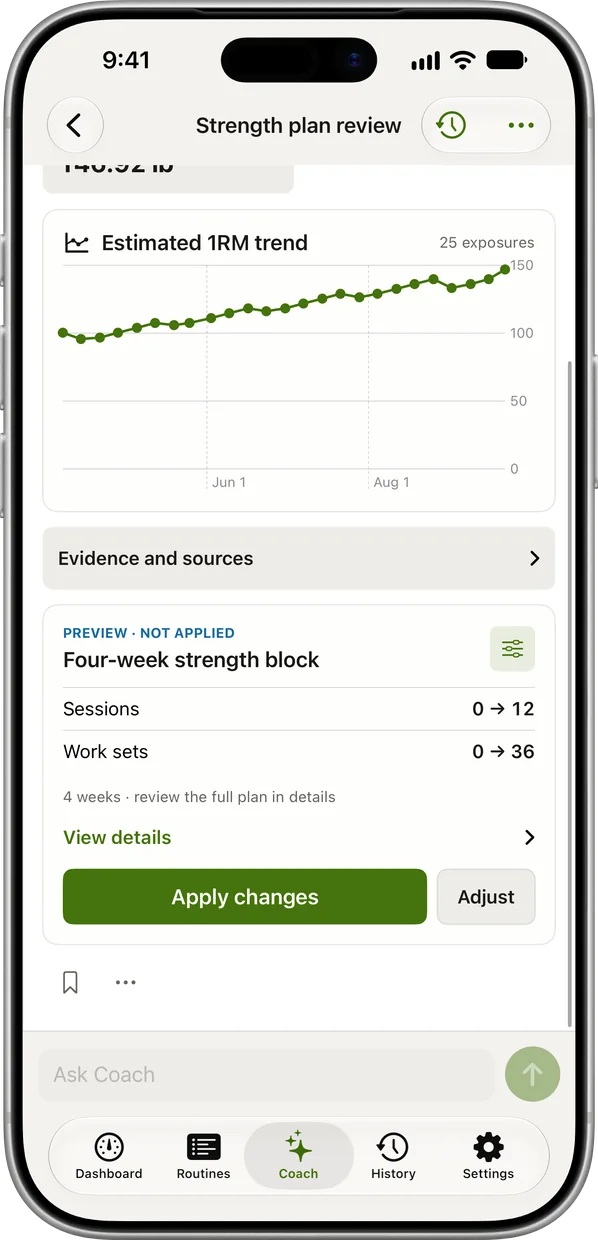
Describe the split you had in plain words: four days, upper/lower, a home gym with dumbbells. The plan arrives as a preview with Apply changes or Adjust.
-
Pick a pace
Steady takes smaller steps, Push bigger ones. With Ask first, next session's weights wait on the recap until you confirm.
When a different app fits better
- You track food in MacroFactor and want one subscription. MacroFactor Workouts, in the $89.99/year bundle.
- You run Jeff Nippard's programs. MacroFactor Workouts, which imports the ones you own with his technique videos.
- You're on Android, or train from an iPad or Mac. MacroFactor Workouts. RIRLift is iPhone and Apple Watch only, with Android on a waitlist.
Questions
How much is the MacroFactor workout app?
$11.99/month, $47.99 for six months or $71.99/year in the US, after a 7-day trial. With MacroFactor nutrition it's $89.99/year for both.
Is MacroFactor Workouts free?
No. There's a 7-day trial and no free tier.
Does MacroFactor Workouts work on Apple Watch?
No. Smartwatches don't connect to it directly; data can reach it through Apple Health. For logging from the wrist, see the best workout apps for Apple Watch.
Does MacroFactor Workouts use AI?
MacroFactor says smart progression runs on rule-based logic, not generative AI. It adjusts from the weights, reps and RIR you log.
Can I import my Hevy or Strong history into MacroFactor Workouts?
No. You can backfill workouts by hand, but it can't import from other workout apps. RIRLift imports Hevy, Strong and FitNotes.
Read next
-
MacroFactor Workouts vs Hevy
The generated program against the free logger.
-
Boostcamp alternatives
Program apps ranked, MacroFactor Workouts included.
-
The AI workout planner that keeps planning after day one
How Coach builds and adjusts a plan.
-
How RIRLift picks your next weight
Where the 140 lb incline came from.
-
RPE vs RIR
Why both apps log reps in reserve.
More ways lifters use RIRLift
-
MacroFactor Workouts vs Hevy
A paid program that adjusts itself against a free logger with a feed, and where RIRLift fits.
-
The RPE and RIR app where effort sets the weight
Log reps in reserve on every set, and your effort decides the next set's weight and the next jump.
-
The AI workout planner that keeps planning after day one
A plan built for your goal, gym and week, with every weight set from what you actually lifted.
-
The hypertrophy app that sets your load from reps in reserve
RIR on every set, weekly sets per muscle, and deloads when a lift stalls instead of on a calendar.