
Fitbod on Apple Watch, and an app that runs on the Watch alone
Published November 3, 2026
Fitbod's Apple Watch app logs sets, runs the rest timer and shows heart rate, but its help center says a workout starts on the iPhone, swapping or adding an exercise needs the iPhone, and the iPhone saves the workout. RIRLift starts, swaps, logs and finishes on the Watch, and sets the next weight there from the reps you had left.
Free on iPhone and Apple Watch · No account · Coming to Android: join the waitlist
Fitbod and RIRLift on the wrist
-
Start the session on the Watch
Fitbod's Watch shows "Start workout on your iPhone" and calls itself a companion app. In RIRLift you open the app on your wrist and start today's routine; the phone can stay in the locker.
-
Swap when the machine is taken
Fitbod needs the iPhone to swap or add an exercise mid-workout. RIRLift swaps from the Watch, and the replacement starts at a weight worked out from the lift you swapped out, adjusted for the equipment.
-
You choose the plan, the Watch sets the weight
Fitbod generates each workout for you. RIRLift keeps the plan you picked, the same lifts each week, and moves the weight on your wrist after every set from the reps you had left. The rules.
-
A rest timer you can nudge
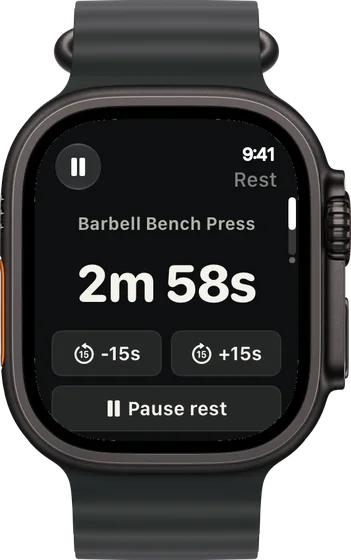
The countdown runs on your wrist with buttons to add or take off 15 seconds, so a busy rack or a hard set doesn't mean guessing.
-
Finish on the wrist
Fitbod's iPhone logs the workout when you tap Finish on the Watch. RIRLift saves the session on the Watch and syncs it to the iPhone when it's back in range.
Sessions that never touch the phone
Upper day, the cable row is taken
Your phone is in the locker. Halfway through, someone settles in at the cable row, so you swap it from the Watch.
| Exercise | You logged | Next session | Why |
|---|---|---|---|
| Chest-Supported Row | Swapped in: 120 lb × 10 / 10 / 10, 2 left | 120 lb × 11 | Its first weight came from your cable row, adjusted for the machine. Every set hit its target of 10, so the target moves to 11. |
| Dumbbell Lateral Raise | 20 lb, 15 / 15 / 15 reps, 1 left | 25 lb × 10 | Every set at the top of 10–15: one step up, reps back to 10. |
The swap, the weights and the save all happened on your wrist.
Same lifts every week, easier than planned
Coming from generated workouts, you now repeat one upper/lower plan. Incline bench felt light all session.
| Exercise | You logged | Next session | Why |
|---|---|---|---|
| Incline Barbell Bench Press | 135 lb, 12 / 12 / 12 reps, 5 left | 145 lb × 8 | Every set at the top of 8–12 with 5 left against a planned 2: the jump is two 5 lb steps, not one. |
| Romanian Deadlift | 185 lb, 10 / 9 / 9 reps, 2 left | 185 lb × 10 | Not every set reached 12, so the weight holds. The weakest set hit its target of 9, so the target moves to 10. |
Repeating the same lifts is what makes the numbers comparable, so each one moves at its own speed.
Plans that run from the Watch
-
The best workout routine for the days you can train
4 days a week: upper/lower
The upper/lower split both examples come from.
4× a week · 68 sets a week · ~40 min
Add to RIRLiftSee the planAdd to RIRLift
Scan with your iPhone camera to add this plan.
-
The best workout plan for muscle gain, for where you are now
Past a year of lifting, gains have stalled
For when the weights have stopped moving: more weekly sets, the same lifts twice a week.
4× a week · 76 sets a week · ~50 min
Add to RIRLiftSee the planAdd to RIRLift
Scan with your iPhone camera to add this plan.
Make it fit you
-
Start from the Watch
Open RIRLift on your wrist and start today's routine. You don't need the phone out to begin.
-
Save your gym's machines
Each saved machine keeps its own loads, so a swap starts from the right number next time.
-
Ask Coach for a plan
If you miss having the workout built for you, ask Coach for a plan on the iPhone and review it before anything changes.
-
Keep your rests honest
Rest is set per exercise in the routine. Use +15 s on a busy day instead of guessing.
When a different app fits better
- You want a new workout generated every session. Fitbod's AI builds each workout for you and varies the exercises.
- You use Strava or Fitbit. Fitbod's listing names both integrations.
- You're on Android or Wear OS. Fitbod's help center covers both; RIRLift is iPhone and Apple Watch only.
Questions
Does Fitbod work with Apple Watch?
Yes. Fitbod's help center says the Watch logs sets, shows the rest timer and heart rate. Starting the workout, swapping or adding exercises and saving it need the iPhone.
Can I start a Fitbod workout on the Watch?
Fitbod's help center says the Watch prompts "Start workout on your iPhone". RIRLift starts the routine on the Watch.
Does RIRLift build my workouts like Fitbod?
You pick a plan or ask Coach for one, and it keeps the same lifts week to week. What changes is the weight, set from every set you log.
Is RIRLift free?
Yes. Unlimited workouts, 4 active routines, the Apple Watch app and suggested weights are free with no account. Pro adds plates per side on the Watch.
Read next
-
Why logging on your wrist beats your phone between sets
What changes when the phone stays in the locker.
-
How RIRLift picks your next weight
Why 135 lb went to 145 lb, not 140.
-
How to use RIR
Rating the reps you had left, the number the Watch works from.
-
The AI workout planner that keeps planning after day one
A plan drafted for you, then weights set from what you log.
-
The best workout routine for the days you can train
The upper/lower split from the examples.
More ways lifters use RIRLift
-
The Apple Watch weightlifting app that runs the whole session
Log sets, rest, load plates and swap machines from your wrist, with the next weight set on the Watch.
-
The AI workout planner that keeps planning after day one
A plan built for your goal, gym and week, with every weight set from what you actually lifted.
-
Hevy on Apple Watch, and what RIRLift does differently
Hevy's Watch app logs sets and rest. RIRLift adds reps in reserve and sets the next weight on the wrist.