
Hevy on Apple Watch, and what RIRLift does differently
Published November 3, 2026
Hevy's Apple Watch app logs your sets, starts rest timers, shows heart rate and finishes the workout without your phone, and the workout saves when the Watch reconnects. RIRLift runs the session from the wrist too, and adds two things: every set takes reps in reserve, and the Watch sets your next weight from it, free. You can bring your Hevy history with you.
Free on iPhone and Apple Watch · No account · Coming to Android: join the waitlist
Hevy and RIRLift on the wrist
-
Both log the session on the Watch
Hevy's App Store listing says you can log sets, start rest timers and finish a workout without touching your phone. RIRLift does the same: start the routine, log each set and finish on the Watch, then it syncs to your iPhone.
-
Reps in reserve on every set
Hevy logs RPE. RIRLift asks the same question from the other end on your wrist: how many more reps you had. RPE 8 is 2 left. That number is what the next weight is built from.
-
The next weight, decided on the Watch
In Hevy, progressive overload guidance comes with Hevy Trainer, part of Hevy Pro. In RIRLift it's free: log a set and the next one adjusts on your wrist, and next session's weight is set from your weakest set. The rules are in how RIRLift picks your next weight.
-
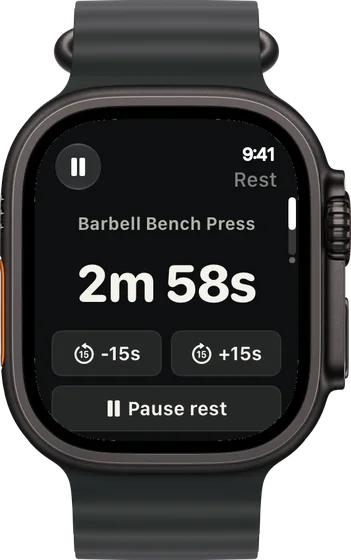
A rest timer you can nudge
The countdown runs on your wrist with buttons to add or take off 15 seconds, so a busy rack or a hard set doesn't mean guessing.
-
Your Hevy history comes along
Export your workouts from Hevy as a CSV and import them in RIRLift. Your first weights come from those sessions instead of a starting guess.
-
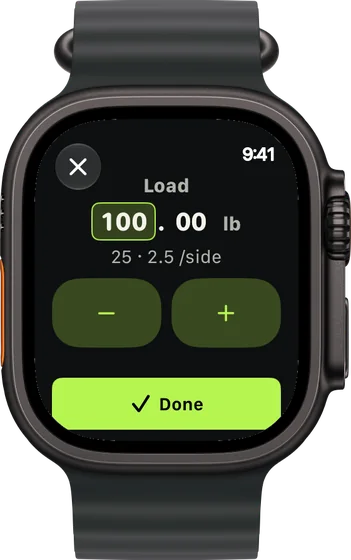
Plates per side, with Pro
Type the weight and the Watch shows what goes on each side of the bar. The breakdown is free on the iPhone; on the Watch it's part of Pro.
Your first weeks after Hevy, run from the Watch
Week 1 after importing, phone in the locker
A four-day upper/lower split at a full gym. You imported two years of Hevy workouts and start bench day from the Watch.
| Exercise | You logged | Next session | Why |
|---|---|---|---|
| Barbell Bench Press | Imported: 185 lb × 8 / 8 / 7 | 185 lb × 8 | Worked out from your Hevy sessions, so day one isn't a guess. |
| Barbell Bench Press | Set 1 on the Watch: 185 lb × 8, 3 left | Set 2: 190 lb × 8 | 11 reps to failure against a planned 10: 185 × 40 ÷ 39 ≈ 190 lb. It changed on your wrist before set 2. |
| Lat Pulldown | 140 lb, 12 / 12 / 12 reps, 2 left | 150 lb × 8 | Every set at the top of 8–12: one step up the stack, reps back to 8. |
Same split you ran in Hevy. The difference is that the weights moved on the Watch, mid-session and for next week.
Home gym, adjustable dumbbells, used to logging RPE
You logged RPE 8 in Hevy. In RIRLift you log 2 left instead, the same effort, on the Watch beside the rack.
| Exercise | You logged | Next session | Why |
|---|---|---|---|
| Dumbbell Romanian Deadlift | 60 lb, 12 / 12 / 12 reps, 2 left | 65 lb × 8 | Every set at the top of 8–12: one 5 lb step on the dumbbells, reps back to 8. |
| Dumbbell Shoulder Press | Set 1: 50 lb × 7, 0 left | Set 2: 45 lb × 8 | Below the 8–12 range with nothing left: 50 × 36 ÷ 39 ≈ 46 lb, rounded to the 45s. |
| Dumbbell Shoulder Press | Set 2: 45 lb × 8, 2 left | Set 3: 45 lb × 8 | On plan, so it holds. The correction stayed one set, not the whole session. |
RPE 8 became 2 left, and the set that went wrong was fixed before the next one.
Plans to run from the Watch after Hevy
-
The best workout routine for the days you can train
4 days a week: upper/lower
The split the first example runs: four days, every muscle twice a week.
4× a week · 68 sets a week · ~40 min
Add to RIRLiftSee the planAdd to RIRLift
Scan with your iPhone camera to add this plan.
-
The best workout with dumbbells, for the dumbbells you actually have
Adjustable dumbbells and a bench, 4 days
The home version, for adjustable dumbbells and a bench.
4× a week · 71 sets a week · ~45 min
Add to RIRLiftSee the planAdd to RIRLift
Scan with your iPhone camera to add this plan.
Make it fit you
-
Import before your first session
Export a CSV from Hevy and import it in RIRLift on the iPhone. Lifts you've logged start from your numbers instead of an estimate.
-
Turn your RPE targets into RIR
Set each exercise's target as reps in reserve: RPE 8 is 2 left, RPE 9 is 1. Your program runs as written.
-
Choose how weights change
Leave weights On to have them set for you, or pick Ask first and confirm next session's numbers on the workout recap before they're saved.
-
Start from the Watch
Open RIRLift on your wrist and start today's routine. The phone can stay in your bag; the session syncs when you're back.
When a different app fits better
- You train with friends and like a feed. Hevy has follows, a social feed and comparisons with friends.
- You're on Android or Wear OS. Hevy runs there; RIRLift is iPhone and Apple Watch only.
- You log RPE and want to keep that scale. Hevy logs RPE per set. RIRLift logs reps in reserve.
- You sync runs and lifts to Strava. Hevy's listing says it syncs workouts to Strava automatically.
Questions
Does Hevy work on Apple Watch?
Yes. Its App Store listing says you can log sets, start rest timers, see heart rate and finish a workout from the Watch, and that workouts save when the Watch reconnects to your phone.
Can I move my Hevy workouts to RIRLift?
Yes. Export your workouts from Hevy as a CSV and import them in RIRLift on the iPhone. Your first weights are worked out from that history.
Does RIRLift log RPE on the Watch?
It logs reps in reserve, the same scale from the other end: RPE 8 is 2 left, RPE 10 is 0. The next weight is set from it.
Is RIRLift's Apple Watch app free?
Yes. Logging, the rest timer, swaps and the next weight on the Watch are free, with no account and no ads. Pro adds plates per side on the Watch.
Do I need my iPhone with me?
No. Start, log and finish on the Watch, and the session syncs to your iPhone later. You do need an iPhone to set RIRLift up.
Read next
-
Why logging on your wrist beats your phone between sets
What changes when the phone stays in your bag.
-
How RIRLift picks your next weight
The rules behind every number in the examples.
-
RPE vs RIR
Moving from Hevy's RPE to reps in reserve.
-
Best workout app for Apple Watch
Hevy, Strong and others, chosen by what you log on your wrist.
-
The best workout routine for the days you can train
The upper/lower split the first example follows.
More ways lifters use RIRLift
-
Strong vs Hevy on Apple Watch
Strong and Hevy are close on the wrist. Here's where they differ, and where RIRLift fits.
-
The Strong app on Apple Watch, and an option that sets the weight
Strong logs on the Watch with or without your iPhone. RIRLift also sets the next weight on your wrist.
-
The Apple Watch weightlifting app that runs the whole session
Log sets, rest, load plates and swap machines from your wrist, with the next weight set on the Watch.