
The Apple Watch weightlifting app that runs the whole session
Published October 27, 2026
A weightlifting app for Apple Watch should log every set from your wrist, time your rest, tell you which plates to load and set the next weight right there. RIRLift does all of that and syncs it to your iPhone, so the phone can stay in your bag from warm-up to the last set.
Free on iPhone and Apple Watch · No account · Coming to Android: join the waitlist
What a lifter needs from an Apple Watch app
-
The whole session on your wrist
Start a routine, log weight, reps and reps in reserve, rest, swap an exercise and finish, all on the Watch. Sets are prefilled from last time, so most sets are one confirm.
-
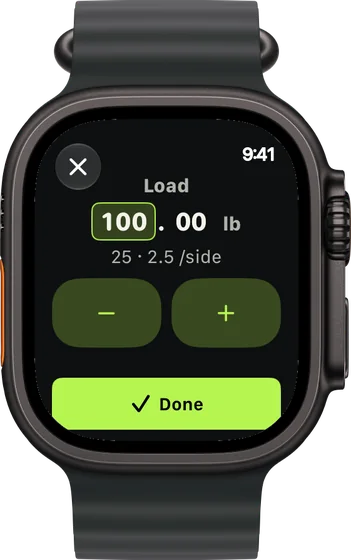
Plate math without a phone
Type the weight and the plate calculator shows what goes on each side of the bar, on the Watch or the iPhone.
-
The next weight, decided on the Watch
Log a set on your wrist and the next one adjusts there: up if you had more left than planned, down if you fell below the range. Phone and Watch stay in sync, and the rules are in how RIRLift picks your next weight.
-
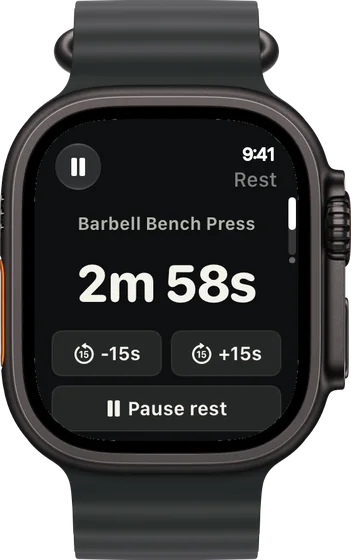
A rest timer you can nudge
The countdown starts on your wrist with buttons to add or take off 15 seconds. On the iPhone it also shows on the Lock Screen and in the Dynamic Island.
-
Swaps when the rack is taken
Swap an exercise from the Watch and the replacement starts at a weight worked out from the lift you swapped out, adjusted for the equipment.
-
How the set moved
After a set logged on the Watch, the rest screen shows your rep pace, cadence and time under tension. Why logging on your wrist beats your phone covers the rest.
Barbell sessions run from the wrist
Deadlift day, phone in the locker
Day 3 of a three-day squat, bench and deadlift plan: heavy deadlifts, then lighter squats. You load the bar from what the Watch shows.
| Exercise | You logged | Next session | Why |
|---|---|---|---|
| Barbell Deadlift | 315 lb, 5 / 5 / 5 reps, 2 left | 320 lb × 3 | Every set at the top of 3–5: one step up, reps back to 3. The Watch shows three 45s and a 2.5 per side. |
| Barbell Back Squat | 205 lb, 8 / 8 / 8 reps, 3 left | 210 lb × 5 | Every set at the top of 5–8 at the planned 3 left: one step up. The Watch shows a 45, a 35 and a 2.5 per side. |
You never took the phone out. Next session's numbers were on the Watch before you left the gym.
Squat day: the first set moved fast
Squat is set at 245 lb for 5 reps with 2 left. You log each set with a tap and check the rest screen between sets.
| Exercise | You logged | Next session | Why |
|---|---|---|---|
| Barbell Back Squat | Set 1: 245 lb × 5, 3 left | Set 2: 250 lb × 5 | 8 reps to failure against a target of 7: 245 × 37 ÷ 36 ≈ 252 lb, rounded to 250 lb. |
| Barbell Back Squat | Set 2: 250 lb × 5, 2 left | Set 3: 250 lb × 5 | On plan, so it holds. Rep pace and time under tension showed on the rest screen. |
| Pull-Up | Bodyweight, 8 / 7 / 7 reps, 2 left | Bodyweight × 8 | Bodyweight lifts progress by reps until you add weight. The weakest set hit its target of 7. |
The correction happened on your wrist between sets, not after the session on your phone.
Every rack is taken
Same plan, a busy Monday. You swap the squat for the hack squat from the Watch, a machine you've never logged.
| Exercise | You logged | Next session | Why |
|---|---|---|---|
| Hack Squat | Swapped in: 180 lb × 10 / 9 / 9, 2 left | 180 lb × 10 | Its first weight came from your squat strength, adjusted for the machine. The weakest set hit its target of 9. |
| Standing Calf Raise | 150 lb, 15 / 15 / 15 reps, 1 left | 160 lb × 10 | Every set at the top of 10–15: one step up on the stack. |
The swap cost you no guesswork. Save the machine and it remembers its own loads next time.
Plans that run well from the Watch
-
The best workout routine for men, for your week
Stronger squat, bench press and deadlift
The plan the examples use: squat, bench and deadlift, where plate math on the wrist saves the most time.
3× a week · 49 sets a week · ~55 min
Add to RIRLiftSee the planAdd to RIRLift
Scan with your iPhone camera to add this plan.
-
The best workout for full body, for your week
Full gym, 3 days: heavy, moderate, light
Barbell, dumbbell and machine days, three times a week.
3× a week · 50 sets a week · ~45 min
Add to RIRLiftSee the planAdd to RIRLift
Scan with your iPhone camera to add this plan.
-
The best workout routine for the days you can train
4 days a week: upper/lower
Four days, every muscle twice a week, with short rests on the arm work.
4× a week · 68 sets a week · ~40 min
Add to RIRLiftSee the planAdd to RIRLift
Scan with your iPhone camera to add this plan.
Make it fit you
-
Start from the Watch
Open RIRLift on your wrist and start today's routine. The session syncs with your iPhone, so you can pick up on either.
-
Set up your bar and plates
With Pro, set custom plates and bar so the plate calculator on your wrist only shows loads your gym can make.
-
Save your gym's machines
Each saved machine remembers its own loads and records, so a swap on the Watch starts from the right number.
-
Keep your rests honest
Rest is set per exercise in the routine. Use the +15 s button on a busy day instead of guessing.
Questions
Can Apple Watch track weightlifting?
Yes, with a lifting app. RIRLift logs weight, reps and reps in reserve for every set on the Watch, then sets the next weight from them. That per-set record is what progress is built on.
Can I leave my iPhone in my bag?
Yes. Logging, the rest timer, the plate calculator, swaps and the next weight all run on the Watch, and the session syncs back to your iPhone.
Does it count my reps?
You confirm reps with a tap, usually prefilled from last time. After a set logged on the Watch, it shows rep pace, cadence and time under tension.
Is the Apple Watch app free?
Yes. Unlimited workouts on iPhone and Apple Watch are in the free tier, with no account and no ads.
Do I need an iPhone?
Yes. RIRLift is an iPhone app with a companion Watch app. The iPhone app also works on its own if you don't wear a Watch.
Read next
-
Best workout app for Apple Watch
Choose by what you need to log on your wrist.
-
Why logging on your wrist beats your phone between sets
What changes when the phone stays in your bag.
-
Barbell calculator
Plates per side for any weight, the same math the Watch shows.
-
The best workout routine for men, for your week
The strength plan the examples follow, in full.
-
Time under tension
What the number on your rest screen means for muscle.
More ways lifters use RIRLift
-
The workout app that puts your lifting in Apple Health
Lifting sessions saved to Apple Health exercise by exercise, next to your runs, with your next weights set.
-
The gym timer app that knows what you lift next
Rest timers set per exercise, on your Lock Screen and Apple Watch, with the next set's weight ready.
-
The workout app for iPhone, built for lifting
Rest timer on the Lock Screen, widgets, Apple Health, and every weight set. Free, no account.