
Strong vs Hevy on Apple Watch
Published November 3, 2026
On the wrist they're close: both start a saved routine, sync live with the phone, log sets, reps and RPE, run an automatic rest timer and replace exercises. Hevy's own comparison calls it a tie: Strong builds sessions on the fly on the Watch, Hevy adds Trainer workouts and heart rate synced to the session. If you want the next weight decided on the Watch for free, that's RIRLift.
Free on iPhone and Apple Watch · No account · Coming to Android: join the waitlist
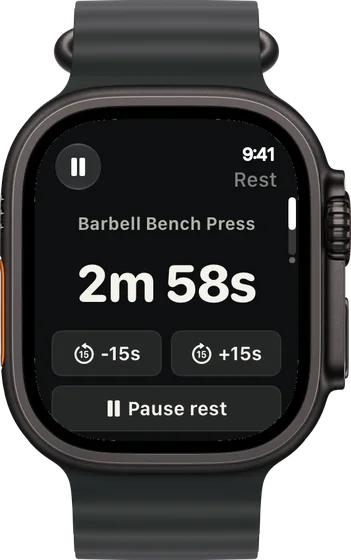
Strong and Hevy on the Watch, point by point
-
Logging: a tie
Both start a routine on the Watch, sync live with the phone, log weight, reps and RPE and run an automatic rest timer. Strong's listing adds that its Watch app works with or without the iPhone; Hevy's says workouts save when the Watch reconnects.
-
Building on the fly: Strong
Hevy's own comparison credits Strong with empty workouts, reordering and supersets made directly on the Watch. In Hevy, supersets are set up on the phone first.
-
Feedback: Hevy
Hevy adds Trainer workouts you can start from your wrist, PR notifications and heart rate synced with the session. Trainer is part of Hevy Pro.
-
Free tier: 3 routines or 4
Strong's free version keeps 3 custom routines. Hevy's keeps 4, with up to 7 custom exercises. Both log unlimited workouts.
-
Where RIRLift is different
RIRLift logs reps in reserve instead of RPE, and the Watch sets the next weight after every set, free, with 4 active routines. How it decides.
What each choice means in a real session
Routine built, phone in the locker
A push day you've run for months, with the bench at 205 for a few weeks. Any of the three apps logs it from the Watch. This is what RIRLift does with the sets.
| Exercise | You logged | Next session | Why |
|---|---|---|---|
| Barbell Bench Press | Set 1: 205 lb × 6, 3 left | Set 2: 210 lb × 6 | In RIRLift: 9 reps to failure against a planned 8, so 205 × 38 ÷ 37 ≈ 211 lb, loaded as 210 lb. |
| Dumbbell Shoulder Press | 55 lb, 10 / 10 / 10 reps, 2 left | 60 lb × 6 | Every set at the top of 6–10: one 5 lb step, reps back to 6. |
The 210 was on your wrist before set 2, worked out from the set you had just done.
Station taken, swap from the Watch
Pull day. The cable row is busy, so you swap it from the Watch, which all three apps allow.
| Exercise | You logged | Next session | Why |
|---|---|---|---|
| Machine Row | Swapped in: 130 lb × 10 / 9 / 8, 2 left | 130 lb × 9 | In RIRLift its first weight came from your cable row, adjusted for the machine. Not every set reached 12, so it holds; the weakest set hit its target of 8, so it aims for 9. |
| Lat Pulldown | 150 lb, 12 / 12 / 12 reps, 2 left | 160 lb × 8 | Every set at the top of 8–12: one step up the stack. |
The swap took a tap, and the machine started from a real number instead of an empty row.
Plans to run from the Watch
-
The best workout routine for men, for your week
Busy: 3 gym days, push/pull/legs
The push and pull days from the examples, three days a week.
3× a week · 48 sets a week · ~40 min
Add to RIRLiftSee the planAdd to RIRLift
Scan with your iPhone camera to add this plan.
-
The best workout routine for the days you can train
4 days a week: upper/lower
Four days, fits RIRLift's 4 free routines.
4× a week · 68 sets a week · ~40 min
Add to RIRLiftSee the planAdd to RIRLift
Scan with your iPhone camera to add this plan.
Make it fit you
-
Import from either app
RIRLift imports CSV exports from Strong and Hevy. Your first weights come from your history.
-
Turn RPE targets into RIR
RPE 8 is 2 left, RPE 9 is 1. Set them once per exercise.
-
Pick Ask first if you want the final say
With Ask first, next session's weights wait on the recap until you confirm them.
When a different app fits better
- You build sessions as you go. Strong, for empty workouts and supersets made on the Watch.
- You want a social feed or Android. Hevy, with a feed, Android and Wear OS.
- You log RPE and want to keep it. Either Strong or Hevy. RIRLift logs reps in reserve.
Questions
Is Strong or Hevy better on Apple Watch?
They're close. Hevy's own comparison calls the Watch apps a tie: Strong for building sessions on the wrist, Hevy for Trainer workouts and heart rate synced to the session.
Which one works without the iPhone?
Strong's listing says its Watch app logs with or without your iPhone. Hevy's says workouts save when the Watch reconnects to the phone.
Which has the better free tier?
Strong keeps 3 custom routines on free, Hevy 4 with up to 7 custom exercises. RIRLift keeps 4 active routines with suggested weights included.
Can I switch to RIRLift from either?
Yes. Export a CSV from Strong or Hevy and import it in RIRLift on the iPhone.
Read next
-
Best workout app for Apple Watch
More options, chosen by what you log on the wrist.
-
RPE vs RIR
Moving from RPE in Strong or Hevy to reps in reserve.
-
How RIRLift picks your next weight
Where the 210 lb came from.
-
Free workout tracker apps
Free tiers compared.
More ways lifters use RIRLift
-
Hevy on Apple Watch, and what RIRLift does differently
Hevy's Watch app logs sets and rest. RIRLift adds reps in reserve and sets the next weight on the wrist.
-
The Strong app on Apple Watch, and an option that sets the weight
Strong logs on the Watch with or without your iPhone. RIRLift also sets the next weight on your wrist.
-
The Apple Watch weightlifting app that runs the whole session
Log sets, rest, load plates and swap machines from your wrist, with the next weight set on the Watch.