
The Strong app on Apple Watch, and an option that sets the weight
Published November 3, 2026
Strong's Apple Watch app logs workouts with or without your iPhone, syncs live with the phone and runs an automatic rest timer; the free version saves unlimited workouts but only 3 custom routines. RIRLift also runs the whole session from the wrist, with 4 free routines, and adds reps in reserve on every set and the next weight set on the Watch.
Free on iPhone and Apple Watch · No account · Coming to Android: join the waitlist
Strong and RIRLift on the wrist
-
Both run without the phone
Strong's listing calls its Watch app fully featured, with or without your iPhone. RIRLift starts, logs and finishes the session on the Watch and syncs it to the iPhone when it's back in range.
-
The weight is decided for you
Strong's listing describes logging, timers and calculators, not suggesting your next weight. RIRLift adjusts the next set on your wrist and sets next session's weight from your weakest set: up a step when every set reaches the top of the range. How it decides.
-
Four free routines, not three
Strong's free version keeps 3 custom routines. RIRLift's free tier keeps 4 active routines with unlimited workouts, so a four-day split fits without paying.
-
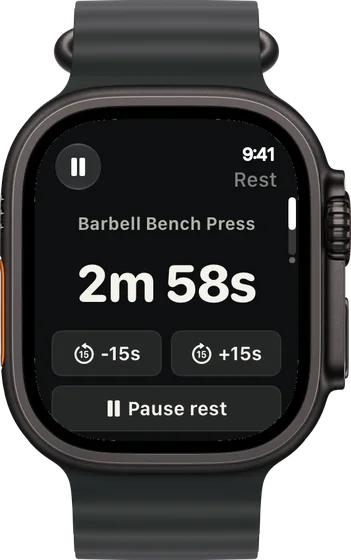
A rest timer you can nudge
The countdown runs on your wrist with buttons to add or take off 15 seconds, so a busy rack or a hard set doesn't mean guessing.
-
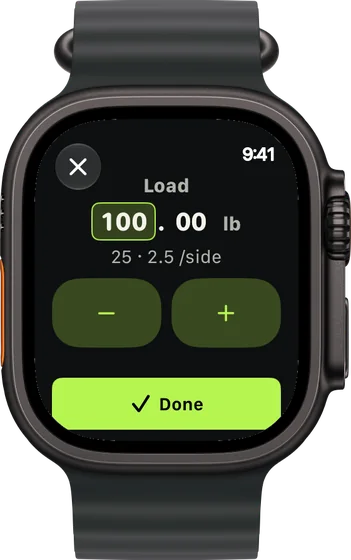
Plates per side, with Pro
Type the weight and the Watch shows what goes on each side of the bar. The breakdown is free on the iPhone; on the Watch it's part of Pro.
-
Your Strong history comes along
Strong exports your workouts as a CSV. Import it in RIRLift and your first weights come from your logged sessions, not a starting guess.
Barbell sessions from the Watch, after Strong
Three-day barbell plan, phone in the locker
Squat, bench and press three days a week, the kind of program Strong is built around. You load the bar from the Watch.
| Exercise | You logged | Next session | Why |
|---|---|---|---|
| Barbell Back Squat | 225 lb, 5 / 5 / 5 reps, 2 left | 230 lb × 3 | Every set at the top of 3–5: one step up, reps back to 3. With Pro, the Watch shows two 45s and a 2.5 per side. |
| Barbell Overhead Press | 115 lb, 5 / 5 / 4 reps, 1 left | 115 lb × 5 | Not every set reached 5, so the weight holds. The weakest set hit its target of 4, so the target moves to 5. |
The 230 was on the Watch before you racked the bar.
Every rack taken, swap on the wrist
Same plan, a busy evening. You swap the squat for the leg press from the Watch, a machine you've never logged.
| Exercise | You logged | Next session | Why |
|---|---|---|---|
| Leg Press | Swapped in: 360 lb × 10 / 10 / 9, 2 left | 360 lb × 10 | Its first weight came from your squat, adjusted for the machine. The weakest set hit its target of 9, so the target moves to 10. |
| Seated Leg Curl | 100 lb, 12 / 12 / 12 reps, 1 left | 110 lb × 8 | Every set at the top of 8–12: one step up the stack. |
The swap started at a real number instead of an empty row. Next time the machine remembers its own loads.
Day one after importing from Strong
You exported three years of Strong workouts and imported them. Deadlift day is the first session in RIRLift.
| Exercise | You logged | Next session | Why |
|---|---|---|---|
| Barbell Deadlift | Imported: 315 lb × 3 / 3 / 3 | 315 lb × 3 | Worked out from your Strong sessions, so the first number isn't a guess. |
| Barbell Row | Imported: 165 lb × 8 / 8 / 8 | 165 lb × 8 | Same source, same weight you left off at. |
No restart. The history you built in Strong sets the first numbers.
Plans that run well from the Watch
-
The best workout routine for men, for your week
Stronger squat, bench press and deadlift
Squat, bench and deadlift with heavy sets of 3 to 5, close to what most Strong users run.
3× a week · 49 sets a week · ~55 min
Add to RIRLiftSee the planAdd to RIRLift
Scan with your iPhone camera to add this plan.
-
The best workout routine for the days you can train
3 days a week: full body
Three full-body days: one routine per day, inside the free tier.
3× a week · 51 sets a week · ~45 min
Add to RIRLiftSee the planAdd to RIRLift
Scan with your iPhone camera to add this plan.
Make it fit you
-
Import your Strong CSV
Export your data from Strong and import it on the iPhone. Every lift you logged starts from your numbers.
-
Set the rep range per lift
Give the squat 3–5 and the accessories 8–12. The weight goes up when every set reaches the top.
-
Set up your bar and plates
With Pro, enter your gym's plates and bar so the Watch only shows loads you can make.
-
Save the machines you swap to
Each saved machine keeps its own loads and records, so the next swap starts from the right number.
When a different app fits better
- You build sessions on the fly on the Watch. Hevy's own comparison credits Strong with empty workouts, reordering and supersets made on the Watch.
- You're on Android. Strong runs on Android; RIRLift is iPhone and Apple Watch only.
- You log RPE. Strong logs RPE. RIRLift logs reps in reserve.
Questions
Does the Strong app work on Apple Watch?
Yes. Its App Store listing describes a fully featured Apple Watch app that logs workouts with or without your iPhone.
Is Strong free?
The free version saves unlimited workouts and up to 3 custom routines, per its listing. More routines need Strong PRO.
Can I move my Strong history to RIRLift?
Yes. Export your workouts from Strong as a CSV and import them in RIRLift on the iPhone. Your first weights come from that history.
Does RIRLift work on the Watch without my iPhone?
The session does: start, log and finish on the Watch, and it syncs to your iPhone later. You need an iPhone to set the app up.
Does RIRLift show plates on the Watch?
Yes, with Pro. On the iPhone the plates per side are free.
Read next
-
How RIRLift picks your next weight
The rules behind 225 to 230 in the first example.
-
Barbell calculator
Plates per side for any weight, the same math the Watch shows.
-
Double progression
Why the weight waits until every set reaches the top.
-
Why logging on your wrist beats your phone between sets
What changes when the phone stays in the locker.
-
The best workout routine for men, for your week
The squat, bench and deadlift plan in full.
More ways lifters use RIRLift
-
Strong vs Hevy on Apple Watch
Strong and Hevy are close on the wrist. Here's where they differ, and where RIRLift fits.
-
Hevy on Apple Watch, and what RIRLift does differently
Hevy's Watch app logs sets and rest. RIRLift adds reps in reserve and sets the next weight on the wrist.
-
A 5x5 app that adds the weight when you earn it
Five sets of five on the big barbell lifts, with the next weight set from how every set went.