
JEFIT on Apple Watch, compared with RIRLift
Published November 3, 2026
JEFIT's Apple Watch app live-syncs your workout with the iPhone and tracks heart rate and calories, and its AI suggests the next weight and reps from your logs, per its App Store listing. RIRLift runs the session from the wrist too: you log reps in reserve on every set, and the Watch adjusts the next set and next session's weight from it, free.
Free on iPhone and Apple Watch · No account · Coming to Android: join the waitlist
JEFIT and RIRLift on the wrist
-
The session on your wrist
JEFIT's listing describes live sync between the phone and the Watch, with set count and rest timer on the Lock Screen. RIRLift starts, logs and finishes on the Watch and syncs it to the iPhone when it's back in range.
-
How the next weight is picked
JEFIT's AI reads your past logs to suggest weight and reps. RIRLift reads the reps you had left on each set: more left than planned and the next set goes up on your wrist, below the range and it comes down. The rules.
-
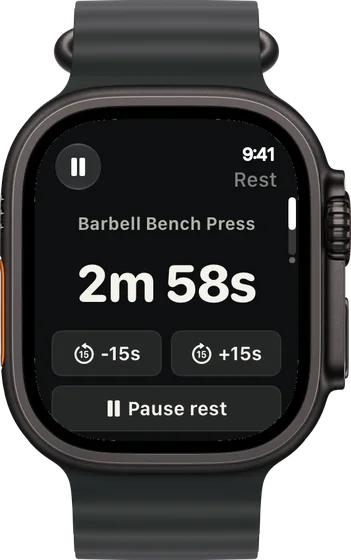
A rest timer you can nudge
The countdown runs on your wrist with buttons to add or take off 15 seconds, so a busy rack or a hard set doesn't mean guessing.
-
A step back when a lift stalls
When a lift goes three sessions without a new rep, the workout recap offers a step back for that lift, about 10% lighter. You choose Deload or Not yet.
-
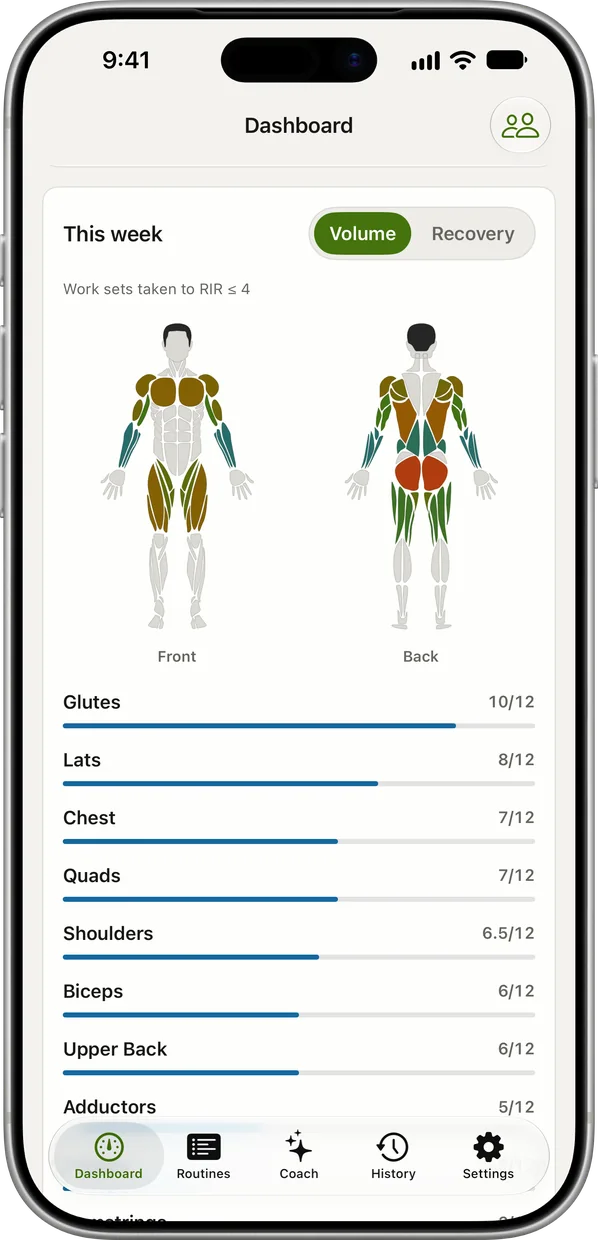
Weekly sets per muscle
Both apps chart sets per muscle. In RIRLift the weekly muscle map on the iPhone is free and fills from what you log on the Watch.
JEFIT-style split days, run from the Watch
Upper day at a full gym, phone in the bag
A bodybuilding-style upper day with dumbbells and cables, everything logged on the wrist.
| Exercise | You logged | Next session | Why |
|---|---|---|---|
| Incline Dumbbell Press | 50 lb, 10 / 10 / 10 reps, 2 left | 50 lb × 11 | Not every set reached 12, so the weight holds. Every set hit its target of 10, so the target moves to 11. |
| Dumbbell Lateral Raise | 15 lb, 15 / 15 / 15 reps, 1 left | 20 lb × 12 | Every set at the top of 12–15: one 5 lb step, reps back to 12. |
| Cable Triceps Pressdown | Set 1: 100 lb × 12, 5 left | Set 2: 110 lb × 12 | 17 reps to failure against a planned 14: 100 × 46 ÷ 43 ≈ 107 lb, rounded to 110 lb on the stack. |
One lift held, one moved mid-session and one moves up next week, each from its own sets.
Bench hasn't moved in three sessions
Week 6 of the plan. Bench is stuck at 205 lb, the same reps three sessions running.
| Exercise | You logged | Next session | Why |
|---|---|---|---|
| Barbell Bench Press | 205 lb, 6 / 6 / 5 reps, third session in a row | Offered: 180 lb × 6 | Three sessions without a new rep: about 10% lighter, rounded down to 180 lb, reps back to the bottom of 6–10. You pick Deload or Not yet. |
| Chest-Supported Row | 130 lb, 10 / 10 / 10 reps, 2 left | 130 lb × 11 | Still moving, so it carries on without a step back. |
Only the lift that stalled stepped back, and only because you said yes.
Splits that run well from the Watch
-
The best workout routine for the days you can train
6 days a week: push/pull/legs
Six days, short sessions, the most weekly sets.
6× a week · 102 sets a week · ~45 min
Add to RIRLiftSee the planAdd to RIRLift
Scan with your iPhone camera to add this plan.
-
The best workout routine for men, for your week
Full gym, 4 days: chest, shoulders and arms first
Four days with chest, shoulders and arms first, like the upper day above.
4× a week · 71 sets a week · ~45 min
Add to RIRLiftSee the planAdd to RIRLift
Scan with your iPhone camera to add this plan.
Make it fit you
-
Check your weekly sets
Open the muscle map on the iPhone after a week of Watch sessions to see which muscles got enough sets.
-
Choose your pace
Steady takes smaller steps, Push takes bigger jumps and waits longer before suggesting a step back.
-
Turn off step-backs if you plan your own
If you run deloads on a schedule, switch off stall suggestions and the recap won't offer them.
When a different app fits better
- You want a huge exercise library. JEFIT lists 1,400+ exercises.
- You time sets with an interval timer. JEFIT can auto-log a set when the interval ends. RIRLift has no interval timers.
Questions
Does JEFIT work on Apple Watch?
Yes. Its listing describes live sync between JEFIT on the iPhone and the Watch, with heart rate and calories tracked as you train.
Does RIRLift suggest weights like JEFIT's AI?
Yes, from a different input: the reps you had left on each set. It adjusts the next set on the Watch and next session's weight from your weakest set.
Does RIRLift show weekly sets per muscle?
Yes. The weekly muscle map on the iPhone counts the sets you log on the Watch, and it's free.
Is RIRLift free?
Yes. Unlimited workouts, 4 active routines, the Apple Watch app and suggested weights are free with no account. Pro adds plates per side on the Watch.
Read next
-
How RIRLift picks your next weight
The rules behind every number above.
-
Deload week
When a lighter week helps, and when it doesn't.
-
Sets per muscle group calculator
How many weekly sets to aim for.
-
The best workout routine for the days you can train
The six-day push/pull/legs plan in full.
More ways lifters use RIRLift
-
The bodybuilding app that counts every set and sets the next weight
Run a size split, see weekly sets per muscle, and let each set's reps in reserve decide the next weight.
-
The hypertrophy app that sets your load from reps in reserve
RIR on every set, weekly sets per muscle, and deloads when a lift stalls instead of on a calendar.
-
The Apple Watch weightlifting app that runs the whole session
Log sets, rest, load plates and swap machines from your wrist, with the next weight set on the Watch.