
Alpha Progression has no Apple Watch app. Here's one that logs RIR
Published November 3, 2026
Alpha Progression has no Apple Watch app: its App Store listing says Only for iPhone, so every set is logged on the phone. If you like how it works, weight, reps and RIR with a suggestion that shifts from set to set, RIRLift does that on the Watch. Log reps in reserve on your wrist and the next set adjusts there, free on iPhone and Apple Watch.
Free on iPhone and Apple Watch · No account · Coming to Android: join the waitlist
What an Alpha Progression user needs on the wrist
-
RIR, logged on the Watch
Alpha Progression logs weight, reps and RIR in two taps on the phone. RIRLift logs the same three on your wrist, with last session's numbers already filled in.
-
The next set adjusts mid-session
Both apps change the next set from what you just did. In RIRLift it happens on the Watch: more reps left than planned and the weight goes up, below the range and it comes down. The rules.
-
Suggestions without a subscription
Alpha Progression's recommendations are part of Pro. RIRLift's suggested weights, on the iPhone and the Watch, are in the free tier.
-
A rest timer you can nudge
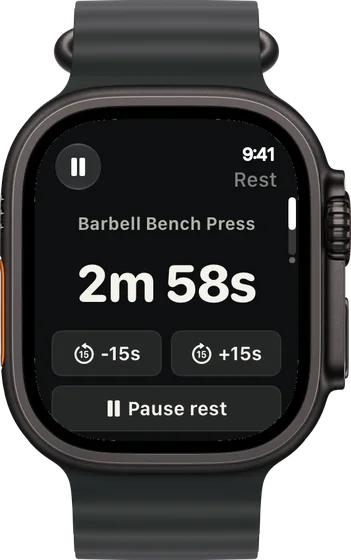
The countdown runs on your wrist with buttons to add or take off 15 seconds, so a busy rack or a hard set doesn't mean guessing.
-
A step back when a lift stalls
Alpha Progression schedules deloads in its periodization. RIRLift offers one when a lift goes three sessions without a new rep, and only if you accept.
RIR-led sessions, run from the Watch
Pull day: three sets, three different calls
Barbell row is set at 155 lb for 8 reps with 2 left, in an 8–12 range. You log each set on the Watch between sets.
| Exercise | You logged | Next session | Why |
|---|---|---|---|
| Barbell Row | Set 1: 155 lb × 8, 4 left | Set 2: 165 lb × 8 | 12 reps to failure against a planned 10: 155 × 41 ÷ 39 ≈ 163 lb, rounded to 165 lb. |
| Barbell Row | Set 2: 165 lb × 8, 2 left | Set 3: 165 lb × 8 | Exactly on plan, so it holds. |
| Barbell Row | Set 3: 165 lb × 7, 1 left | Set 4: 155 lb × 8 | Below the range: 165 × 37 ÷ 39 ≈ 157 lb, rounded to 155 lb. |
The same set-to-set logic you know from Alpha Progression, without the phone in your hand.
Week 5: hip thrust stopped moving
Glute-focused lower day. Hip thrust has sat at 235 lb for 10 reps three sessions running; the split squat is still climbing.
| Exercise | You logged | Next session | Why |
|---|---|---|---|
| Hip Thrust | 235 lb, 10 / 10 / 10 reps, third session in a row | Offered: 210 lb × 8 | Three sessions without a new rep: about 10% lighter, rounded to 210 lb, reps back to the bottom of 8–12. |
| Bulgarian Split Squat | 40 lb, 12 / 12 / 12 reps per leg, 2 left | 45 lb × 8 | Every set at the top of 8–12: one 5 lb step, reps back to 8. |
One lift steps back, the other keeps climbing. Nothing changes until you accept the deload.
Plans built on reps in reserve
-
The best workout plan for muscle gain, for where you are now
Past a year of lifting, gains have stalled
Hard sets counted per muscle, the way Alpha Progression users already think.
4× a week · 76 sets a week · ~50 min
Add to RIRLiftSee the planAdd to RIRLift
Scan with your iPhone camera to add this plan.
-
The best workout for your glutes and butt
Full gym, glute focus twice a week
The glute-led lower day the second example comes from.
2× a week · 24 sets a week · ~40 min
Add to RIRLiftSee the planAdd to RIRLift
Scan with your iPhone camera to add this plan.
Make it fit you
-
Set an RIR target per exercise
Give compounds 2 left and isolation work 1 or 0. The next weight is set against that target.
-
Choose your pace
Steady for smaller, surer steps, Push for bigger jumps. Standard is double progression.
-
Start from the Watch
Open RIRLift on your wrist and start today's routine. The phone can stay in your bag.
When a different app fits better
- You want periodization planned week by week. Alpha Progression ramps sets and RIR across weeks and schedules deloads.
- You train at several gyms. Alpha Progression's Pro supports multiple gyms.
- You don't wear a Watch. Alpha Progression's iPhone app logs RIR in two taps.
Questions
Does Alpha Progression have an Apple Watch app?
No. Its App Store listing says Only for iPhone, and the supported devices don't include Apple Watch.
Can I log RIR on Apple Watch?
Yes, in RIRLift. Every set takes weight, reps and reps in reserve on the Watch, and the next set adjusts from them.
Does RIRLift plan deloads like Alpha Progression?
It offers one when a lift stalls for three sessions, about 10% lighter. You accept or skip it.
Is RIRLift free?
Yes. Logging, suggested weights and the Apple Watch app are free with no account. Pro adds plates per side on the Watch.
Read next
-
How to use RIR
Rating reps in reserve consistently.
-
How RIRLift picks your next weight
The set-to-set rules in full.
-
RIR vs going to failure
How close each set should end.
-
Deload week
When a lighter week helps.
More ways lifters use RIRLift
-
The RPE and RIR app where effort sets the weight
Log reps in reserve on every set, and your effort decides the next set's weight and the next jump.
-
The hypertrophy app that sets your load from reps in reserve
RIR on every set, weekly sets per muscle, and deloads when a lift stalls instead of on a calendar.
-
The Apple Watch weightlifting app that runs the whole session
Log sets, rest, load plates and swap machines from your wrist, with the next weight set on the Watch.