
Custom lifting workouts you build once and run from your Watch
Published November 3, 2026
Apple's Custom Workouts are built from a warmup, work and recovery intervals and a cooldown, each set by time, distance or left open. That suits a run or a HIIT block, but a lifting session is exercises, sets, reps and weights. In RIRLift you build that on iPhone, with rep ranges, reps in reserve, rest and supersets, then start it on Apple Watch, log every set there and get the next weight set on your wrist.
Free on iPhone and Apple Watch · No account · Coming to Android: join the waitlist
What a custom lifting workout needs
-
Built from exercises, not intervals
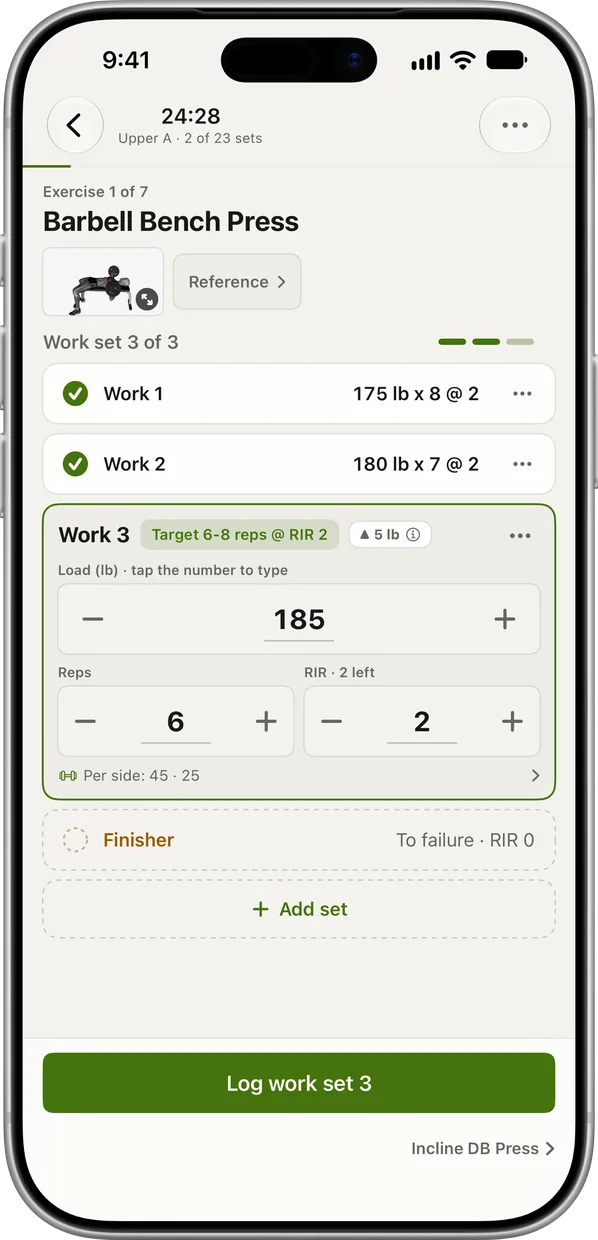
Make a new routine on iPhone from the exercise library or your own exercises. Each one gets its sets, rep range, target reps in reserve, rest and warm-up sets.
-
Started from your wrist
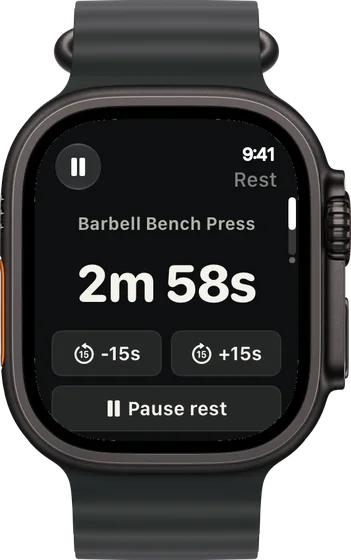
Your routines appear on the Watch, with this week's next one first. Tap the routine, picking your gym first if you've saved one, and the first set is ready with its weight.
-
Changed mid-session on the Watch
Replace an exercise when the station is taken, add one with its own sets, rep range, RIR and rest, or remove one, all from the Watch.
-
Rounds and mini-sets, lifting style
Pair two exercises as a superset and the Watch shows which round you're on. Rest-pause sets run as mini-sets with their own short rests.
-
Weights that build themselves
You set the rep range; RIRLift sets the weight. Every set you log moves the next one, so a custom routine never needs its loads rewritten.
Three custom workouts, run from the Watch
A 45-minute push day, built from scratch
You build it on iPhone: bench for 3 × 6–8 at 2 left, incline dumbbells for 3 × 8–12, pressdowns for 3 × 10–15 at 1 left. Then you run it from the Watch.
| Exercise | You logged | Next session | Why |
|---|---|---|---|
| Barbell Bench Press | 175 lb, 8 / 7 / 7 reps, 2 left (target 7) | 175 lb × 8 | The weakest set hit today's target. Same weight, one more rep. |
| Incline Dumbbell Press | 50 lb, 12 / 12 / 12 reps, 2 left (range 8–12) | 55 lb × 8 | Every set at the top of the range: one dumbbell step, reps back to 8. |
| Cable Triceps Pressdown | 50 lb, 12 / 12 / 11 reps, 1 left (target 11) | 50 lb × 12 | The weakest set made 11. Hold the weight, aim for 12. |
You wrote the sets and ranges once. The weights are the app's job from here.
The gym is busy, so you change it on the Watch
Pull day, and the barbells are all in use. You replace the barbell row from the Watch and add face pulls at the end, a lift you've logged before.
| Exercise | You logged | Next session | Why |
|---|---|---|---|
| Chest-Supported Row | Replaced the barbell row: 100 lb × 12 / 11 / 11, 2 left (target 11, range 8–12) | 100 lb × 12 | Its first weight came from your barbell row, adjusted for the machine. The weakest set made its target. |
| Face Pull | Added on the Watch, 2 × 12–15: 40 lb, 15 / 15 reps, 1 left | 50 lb × 12 | Both sets at the top of the range you set: one stack step, reps back to 12. |
Nothing about the change needed the phone, and both lifts kept their own history.
Two days a week with home dumbbells
A full-body routine for adjustable dumbbells and a bench, run twice a week in the garage with the phone charging inside.
| Exercise | You logged | Next session | Why |
|---|---|---|---|
| Goblet Squat | 40 lb, 12 / 12 / 12 reps, 2 left (range 8–12) | 45 lb × 8 | Top of the range on every set at the planned effort: one 5 lb step, reps back to 8. |
| Flat Dumbbell Press | 45 lb, 10 / 9 / 9 reps, 2 left (target 9, range 8–12) | 45 lb × 10 | The weakest set made today's target. Same dumbbells, one more rep. |
| Dumbbell Curl | 25 lb, 12 / 11 / 10 reps, 1 left (target 10, range 8–12) | 25 lb × 11 | Same rule on a small lift: the weakest set decides. |
A custom routine for two days and one set of dumbbells progresses the same way a gym plan does.
Ready-made routines to customize
-
The best workout for full body, for your week
Only 2 days a week, longer sessions
A two-day starting point to rename, reorder and make your own.
2× a week · 45 sets a week · ~50 min
Add to RIRLiftSee the planAdd to RIRLift
Scan with your iPhone camera to add this plan.
-
The best workout with dumbbells, for the dumbbells you actually have
30 minutes, 3 days, supersets
Supersets already paired, for short sessions with dumbbells.
3× a week · 48 sets a week · ~25 min
Add to RIRLiftSee the planAdd to RIRLift
Scan with your iPhone camera to add this plan.
-
The best workout routine for the days you can train
4 days a week: upper/lower
Four days to trim or extend, one exercise at a time.
4× a week · 68 sets a week · ~40 min
Add to RIRLiftSee the planAdd to RIRLift
Scan with your iPhone camera to add this plan.
Make it fit you
-
Set rest per exercise
Give heavy compounds longer rests and isolation shorter ones in the routine. On the Watch, ±15 seconds covers a busy day.
-
Pair a superset
In the routine editor, set an exercise as a superset with the one next to it and give the pair one group rest.
-
Choose warm-up sets
Let Coach pick the warm-ups for each lift, or set a fixed number, up to 5.
-
Log each exercise in its own unit
Set the unit printed on the equipment per exercise, so kilo dumbbells and a pound stack sit in one routine.
-
Start from the session builder
Pick exercises and your gear in the session builder and it opens in RIRLift with sets, reps, rest and starting loads.
When a different app fits better
- You want a timed interval run or a HIIT block with work and recovery by the clock. Apple's own Custom Workouts in the Workout app are built for that. RIRLift has no interval timer.
Questions
How do I create a custom workout on Apple Watch?
In Apple's Workout app, turn the Digital Crown to a workout, tap the Goals button, tap Custom, then add a warmup, work and recovery intervals and a cooldown. For a lifting session with sets and weights, build a routine in RIRLift on iPhone and start it from the Watch.
Can I make a custom strength workout with sets and reps?
Yes, in RIRLift. Each exercise in a routine has its sets, rep range, reps in reserve and rest, and the Watch logs weight, reps and reps in reserve for every set.
Can I build the routine on the Watch?
Routines are built on iPhone. During a session on the Watch you can replace, add or remove exercises and set their sets, reps, RIR and rest.
Do I need to enter the weights?
No. A lift you've logged starts from your history; a new one opens at a light estimate and the first set measures you. After that, each set you log sets the next.
Is it free?
Yes. Up to 4 active routines, unlimited workouts and the Apple Watch app are free, with no account. Pro adds unlimited routines and plates per side on the Watch.
Read next
-
Session builder
A custom session for your gear that opens in RIRLift.
-
What is a superset?
How to pair exercises in a custom routine.
-
Rest-pause sets
The mini-set format the Watch runs for you.
-
Why logging on your wrist beats your phone between sets
What running a routine from the Watch feels like.
-
The best workout for full body, for your week
Full routines to start from instead of a blank page.
More ways lifters use RIRLift
-
The workout planner app where your plan keeps up with you
Build your week on a laptop or with Coach, give it a finish line, and let the weights follow your sets.
-
The Apple Watch weightlifting app that runs the whole session
Log sets, rest, load plates and swap machines from your wrist, with the next weight set on the Watch.
-
The workout routine app that fits the days you can train
A routine for 3, 4 or 6 days a week, and every lift's progress kept when you switch.