
The resistance band app for your Apple Watch
Published November 3, 2026
On Apple Watch, log a band like a weight: its rated pounds (stacked bands added up), your reps and how many you had left. RIRLift sets the next target from that, on the Watch, and saves the session to Apple Health as Traditional Strength Training, so there's no workout type to pick. Free on iPhone and Apple Watch.
Free on iPhone and Apple Watch · No account · Coming to Android: join the waitlist
What a band session needs from your wrist
-
A band logged like a weight
Enter the resistance printed on the band as the weight. Stacking a 30 and a 10? Log 40 lb. Keep the anchor and stance the same, so last week's 40 means the same thing this week.
-
Reps first, then the next band
When your weakest set hits today's target, the next target is one rep higher. When every set reaches the top of the range, it's time for the next band and the target resets to the bottom.
-
Rest and supersets on the wrist
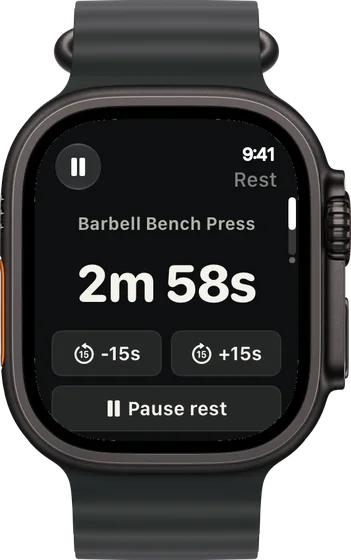
The rest timer starts when you log a set, with +15 s and -15 s on the Watch. Pair a band pull with a push and the Watch counts the rounds for you.
-
No workout type to choose
Any session with band or weight work in it is saved to Apple Health as Traditional Strength Training, in the same history as your other workouts. You never pick Functional or Traditional yourself.
-
Free, with no account
Unlimited workouts, progression, the Apple Watch app and up to 4 active routines are free, with no ads.
Band sessions logged from the Watch
Doorway bar and handle bands, phone on the charger
Upper day at home with bands rated 10, 20, 30, 40 and 50 lb and a pull-up bar in the doorway. Everything is logged on the Watch.
| Exercise | You logged | Next session | Why |
|---|---|---|---|
| Band Bent-Over Row | 40 lb (30 + 10 stacked), 14 / 13 / 12 reps, 1 left | 40 lb × 13 | The range is 12–20 and the weakest set hit today's target of 12. Same stack, one more rep. |
| Pull-Up | Bodyweight, 7 / 6 / 6 reps, 1 left | Pull-Up × 7 | Bodyweight lifts progress by reps. The weakest set hit its target of 6. |
| Band Overhead Press | Set 1: 20 lb × 15, 4 left (planned 2) | Set 2: 20 lb × 15 | Easier than planned works out to about 21 lb (20 × 48 ÷ 46), which rounds back to 20: the band stays and the reps do the climbing. |
The phone never left the charger. Each target was on the Watch before the next set.
Pull and push supersets, 30 minutes
A short evening session: face pulls paired with push-ups, then pull-aparts on their own. The Watch shows the superset round you're on.
| Exercise | You logged | Next session | Why |
|---|---|---|---|
| Band Face Pull | 20 lb, 20 / 20 / 20 reps, 2 left | Next band up × 12 | Every set at 20, the top of 12–20: move to the 30 lb band, target back to 12. |
| Push-Up | Bodyweight, 18 / 16 / 15 reps, 1 left | Push-Up × 16 | Today's target was 15 and the weakest set made it, so aim for 16. |
| Band Pull-Apart | 10 lb, 22 / 20 / 18 reps, nothing left (target 20) | 10 lb × 20 | The weakest set fell short of 20, so the band and the target both stay. |
One exercise moved up a band, one climbed a rep, one held. Each was decided by its own sets.
Hotel room, one 30 lb loop band, travel-tired
A lower-body day squeezed in after a flight. One loop band in the suitcase, the Watch on your wrist.
| Exercise | You logged | Next session | Why |
|---|---|---|---|
| Band Squat | 30 lb, 16 / 15 / 14 reps, nothing left (target 18) | 30 lb × 18 | The weakest set fell short of 18, so band and target stay. One rough session isn't read as your new normal. |
| Band Reverse Lunge | 30 lb, 12 / 12 / 11 reps per leg, 1 left (target 11) | 30 lb × 12 | The weakest set hit 11, so the next target is one rep higher. |
| Band Good Morning | 30 lb, 15 / 15 / 15 reps, 3 left | Next band up × 10 | Every set at 15, the top of 10–15: the next band is due, for when you're home with the 40. |
A bad day moved nothing backwards, and the session still landed in Apple Health as strength training.
Band plans that run well from the Watch
-
The best workout for home, with little or no equipment
Pull-up bar and bands, 4 days
The plan behind the first example: bands for rows and presses, a doorway bar for the pulling bands do poorly.
4× a week · 58 sets a week · ~40 min
Add to RIRLiftSee the planAdd to RIRLift
Scan with your iPhone camera to add this plan.
-
The best workout for your glutes and butt
Home with dumbbells and a band
Hip thrusts, abductions and walks on bands, with dumbbells where a band runs out.
2× a week · 22 sets a week · ~30 min
Add to RIRLiftSee the planAdd to RIRLift
Scan with your iPhone camera to add this plan.
-
The best workout for thighs, inner thighs included
Home with dumbbells and a band
A lower-body plan with one band and a pair of dumbbells, suitcase-sized.
2× a week · 24 sets a week · ~35 min
Add to RIRLiftSee the planAdd to RIRLift
Scan with your iPhone camera to add this plan.
Make it fit you
-
Mark the rating on each band
Write the pounds on the handle or loop with a marker. The Watch only needs the number.
-
Log stacks as their sum
A 30 and a 10 together is 40 lb. Use the same combination, anchor and stance each week so the numbers compare.
-
Keep one band per exercise for a block
Let the reps climb to the top of the range before changing band. When the app raises the weight, the next band is due.
-
Superset pulls and pushes
Group a band pull and a push as a superset in the routine. The Watch shows which round you're on, so you never lose count.
Questions
How do I log resistance bands on Apple Watch?
Enter the band's rated pounds as the weight, then your reps and how many you had left. If you stack bands, add them up. RIRLift sets the next target from those three numbers.
Which workout type should I pick for resistance bands?
In RIRLift, none. Any session with band or weight work in it is saved to Apple Health as Traditional Strength Training.
Do resistance bands count as resistance training?
Yes. A band loads the muscle the way a weight does, and it progresses the same way: more reps, then a heavier band. RIRLift logs and progresses both alike.
Is there an Apple Watch app specifically for strength training?
Yes. RIRLift runs the whole session on the Watch: log each set, rest, swap exercises and get the next target, with weights, bands or bodyweight.
Is it free?
Yes. Unlimited workouts, progression, the Apple Watch app and up to 4 active routines are free, with no account and no ads.
Read next
-
The resistance band workout app that tracks every band
Band plans and progression on iPhone.
-
Full body exercises with resistance bands
What bands train well, and how to set each one up.
-
The best workout for home, with little or no equipment
The bar-and-bands plan in full.
-
Why logging on your wrist beats your phone
What changes when the phone stays out of reach.
More ways lifters use RIRLift
-
The resistance band workout app that tracks every band
Log each band by its rating, stack them, and move up when every set tops the range.
-
The Apple Watch weightlifting app that runs the whole session
Log sets, rest, load plates and swap machines from your wrist, with the next weight set on the Watch.
-
The travel workout app that keeps your lifts moving on the road
Save the hotel gym, lift with the dumbbells it has, and come home to your program where you left it.