
The workout app for iPhone, built for lifting
Published October 27, 2026
If you lift, the best workout app for iPhone is one built for sets and reps that uses the phone properly: a rest timer you can read without unlocking, widgets for your next session, and workouts that land in Apple Health. RIRLift does all of that, free and with no account, and sets every weight from what you lifted last time.
Free on iPhone and Apple Watch · No account · Coming to Android: join the waitlist
What a lifting app should do on iPhone
-
Rest time without unlocking
The rest timer fills the screen in the app, and keeps counting on the Lock Screen and in the Dynamic Island as a Live Activity. Put the phone down between sets and still see when to go. How long to rest between sets covers what to set it to.
-
Your next session on the Home Screen
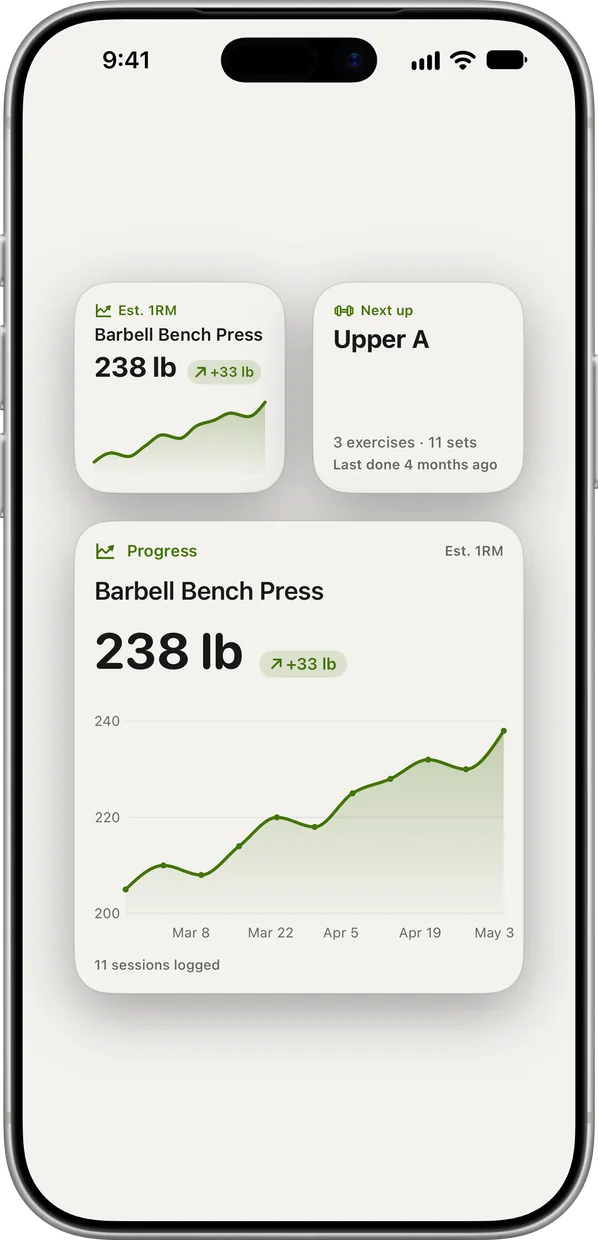
Widgets show the next session up and the trend for your top lift. One tap opens the session with its weights already set.
-
Workouts that land in Apple Health
Every workout you finish on iPhone saves to Apple Health, with each exercise as its own segment. Turn on iCloud sync to keep your log across devices.
-
Free, with no account and no ads
Unlimited workouts, suggested weights, the weekly muscle map and up to 4 active routines are free. Pro adds more Coach conversations, unlimited routines, all-time analytics and CSV export.
-
Apple Watch if you want it
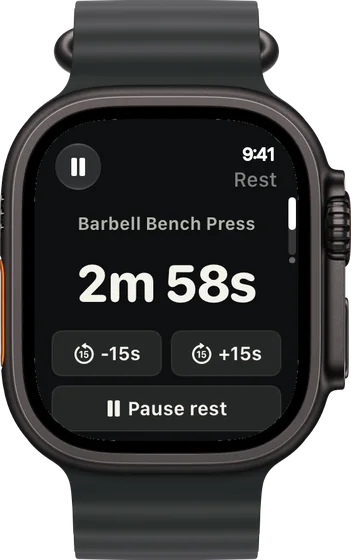
The iPhone app does everything on its own. With an Apple Watch, the whole session runs from your wrist: logging, rest timer, plate calculator and swaps.
Sessions run from an iPhone
Gym day, phone face down on the bench
Day 1 of the two-day full-body plan below. The rest timer runs on the Lock Screen between sets.
| Exercise | You logged | Next session | Why |
|---|---|---|---|
| Barbell Back Squat | 185 lb, 10 / 10 / 10 / 10, 2 left | 190 lb × 6–10 | Top of 6 to 10 on every set. One step up next week, reps reset to 6. |
| Barbell Bench Press | Set 1: 155 lb × 8, 3 left | Set 2: 165 lb × 8 | Two more reps left than the 1 planned. 155 × 40 ÷ 38 is about 163, rounded to 165. |
| Lat Pulldown | 140 lb, 12 / 12 / 11 / 11, 1 left | 140 lb × 12 | The weakest set made today's target of 11, so next time you aim for 12. |
You unlocked the phone to log each set and nothing else. The workout saved to Apple Health when you finished.
Home, no equipment, phone propped on the couch
Bodyweight A from the no-equipment plan below. With no load to add, these progress by reps; "1 left" is your reps in reserve.
| Exercise | You logged | Next session | Why |
|---|---|---|---|
| Push-Up | 18 / 16 / 15, 1 left | 16 reps | The weakest set made today's target of 15, so the target rises by one. |
| Reverse Lunge | 18 / 17 / 16 per leg, 1 left | 17 reps per leg | Same rule: the weakest set hit its target of 16. |
| Nordic Hamstring Curl | 5 / 4 / 4, 2 left | 5 reps | The weakest set missed the target of 5, so the target stays. |
Bodyweight work keeps moving by reps until you choose to add weight.
Plans that open on your iPhone
-
The best workout for full body, for your week
Only 2 days a week, longer sessions
The gym example above: two full-body days, squat and bench in the first.
2× a week · 45 sets a week · ~50 min
Add to RIRLiftSee the planAdd to RIRLift
Scan with your iPhone camera to add this plan.
-
The best workout for home, with little or no equipment
No equipment, 3 days a week
The home example above: nothing but floor space, a doorway and a chair.
3× a week · 44 sets a week · ~35 min
Add to RIRLiftSee the planAdd to RIRLift
Scan with your iPhone camera to add this plan.
Make it fit you
-
Add the widgets
Long-press the Home Screen and add RIRLift's widgets: one for your next session, one for your top lift's trend.
-
Allow Apple Health
Allow RIRLift to save workouts to Apple Health. Each exercise lands as its own segment of the workout.
-
Pick your units per lift
Units are set per exercise, so kilo plates and pound dumbbells can sit in the same workout. The plate calculator shows what goes on each side.
-
Bring your old workouts
Coming from another app? Import your history from Hevy, Strong or FitNotes and Coach reads it from day one.
Questions
What's the best free workout app for iPhone?
For lifting, one that's free where it counts: unlimited workouts and weight suggestions. RIRLift includes both, plus up to 4 active routines and the Apple Watch app, with no account and no ads.
Does it work without an Apple Watch?
Yes. RIRLift is a complete iPhone app. The Watch app is optional.
Does it sync with Apple Health?
Yes. Workouts finished on iPhone save to Apple Health, each exercise as its own segment.
Can I see the rest timer on the Lock Screen?
Yes. The rest timer runs as a Live Activity on the Lock Screen and in the Dynamic Island.
Can I use it at home?
Yes. Tell it your equipment, or none at all, and plans stay inside it. Bodyweight exercises progress by reps. Best workout for home has plans for each setup.
Read next
-
The best free workout tracker apps for lifters (2026)
What free tiers really include, compared.
-
Best workout app for Apple Watch: choose by what you need to log
If you're adding a Watch to the iPhone.
-
The best workout for home, with little or no equipment
The no-equipment plan and more, in full.
-
The best workout for full body, for your week
The two-day gym plan in the first example.
-
How long to rest between sets, based on your goal
What the rest timer should be set to.
More ways lifters use RIRLift
-
The Apple Watch weightlifting app that runs the whole session
Log sets, rest, load plates and swap machines from your wrist, with the next weight set on the Watch.
-
The workout app that puts your lifting in Apple Health
Lifting sessions saved to Apple Health exercise by exercise, next to your runs, with your next weights set.
-
A workout app you can train on for years without a subscription
Unlimited workouts, weights set for you and Apple Watch, free with no trial countdown, account or ads.
-
The workout app for home that plans around what you own
Bare floor, a pull-up bar, bands or one kettlebell: a plan for your gear that gets harder as you do.