
The gym tracker that turns your logs into your next weight
Published October 27, 2026
A gym tracker should do more than store numbers. It should show whether each lift is moving and tell you what to lift next. RIRLift logs weight, reps and reps left per set, charts every lift's estimated max, and sets the next session from what you logged. Bring your history from Hevy, Strong or FitNotes and it works from day one.
Free on iPhone and Apple Watch · No account · Coming to Android: join the waitlist
What a gym tracker should show you
-
Your history comes with you
Import from Hevy, Strong or FitNotes. Coach reads it from day one, and your first weights are worked out from those sets, marked From history, instead of starting you light.
-
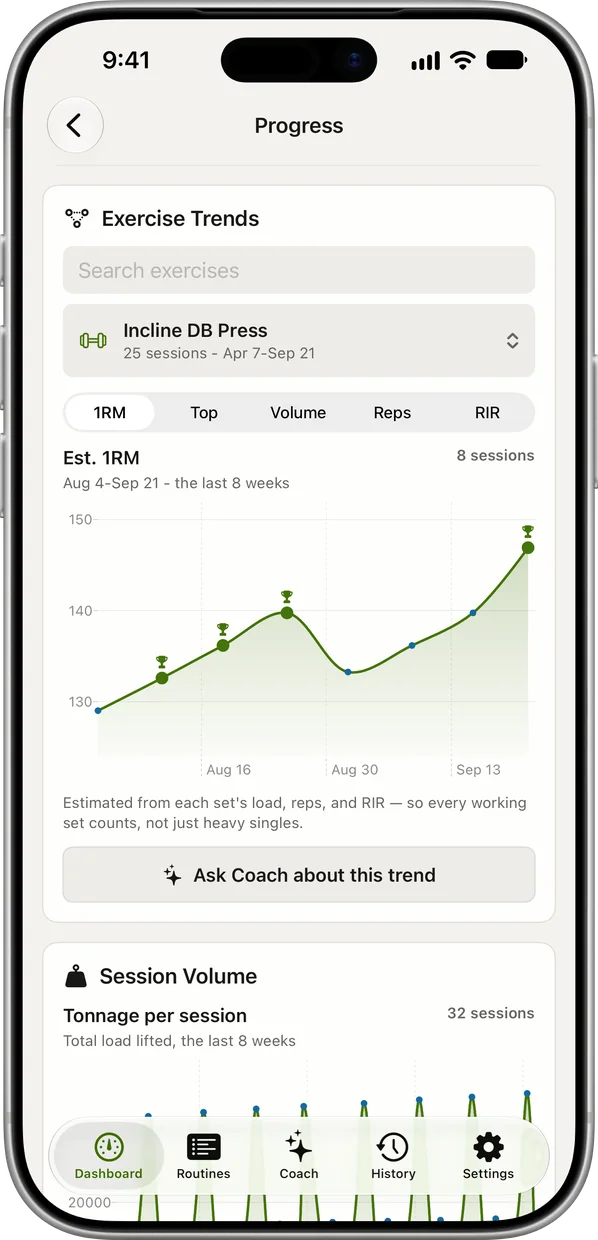
A trend for every lift
Each exercise has its estimated one-rep max charted over time, so you see whether a lift is climbing across weeks, not just whether today felt heavy.
-
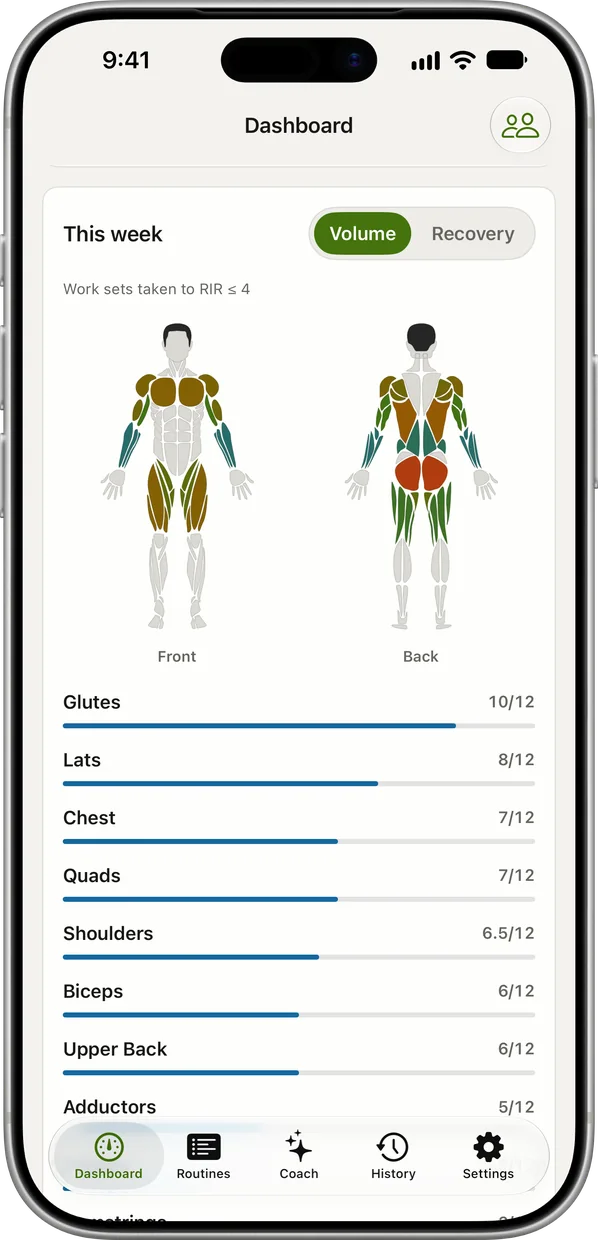
Where your week's sets went
The weekly muscle map shades each muscle by the sets it got, with the count beneath. Recovery per muscle group shows what's ready to train again. How many sets per muscle gives the targets to compare against.
-
A flat line gets an answer
When a lift goes three sessions without a new rep, the workout recap suggests a step back of about 10%. You choose Deload or Not yet, so the tracker acts on the stall instead of just drawing it.
-
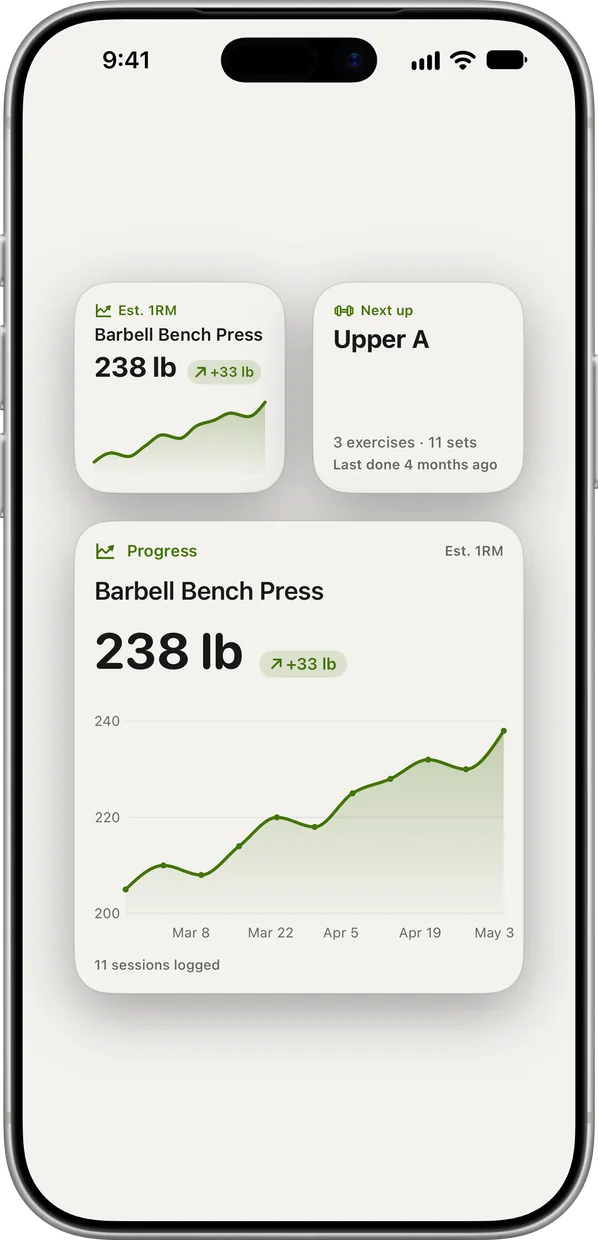
Your top lift on the Home Screen
Widgets show your next session and the trend for your top lift without opening the app. Pro keeps all-time analytics and exports everything to CSV.
What the tracker does with your logs
First session after importing two years of logs
You've switched trackers and brought your history. Today is Upper Heavy on the stalled-intermediate plan below.
| Exercise | You logged | Next session | Why |
|---|---|---|---|
| Barbell Bench Press | Imported: 205 lb × 8 / 7 / 6 in your old app | From history × 5–8 | Worked out from your imported sets, not a light estimate. Tap it to open Why this weight. |
| Lat Pulldown | 160 lb, 12 / 12 / 12, 1 left | 170 lb × 8–12 | Your first session logged here: every set at the top of 8 to 12, so one step up and reps reset to 8. |
Switching apps didn't reset you to beginner weights. The history you brought is the starting point.
The squat line has gone flat
Lower Heavy, week 6. The trend shows the squat hasn't moved in three sessions; the Romanian deadlift has.
| Exercise | You logged | Next session | Why |
|---|---|---|---|
| Barbell Back Squat | 245 lb, 6 / 6 / 5 / 5, three sessions running | Recap suggests 220 lb × 5–8 | No new rep in three sessions. About 10% lighter, rounded to your plates. You choose Deload or Not yet. |
| Romanian Deadlift | 225 lb, 10 / 10 / 10, 2 left | 235 lb × 6–10 | Still moving: top of 6 to 10 on every set, so one step up. |
The chart shows the stall and the recap answers it, lift by lift.
A rough day stays a rough day
Upper Volume after a bad night's sleep. The incline press is planned at 10 reps with 1 left.
| Exercise | You logged | Next session | Why |
|---|---|---|---|
| Incline Dumbbell Press | 70 lb pair × 7, nothing left | 65 lb pair × 10 | Below the 8 to 12 range: 70 × 36 ÷ 40 is about 63, rounded to the 65s. Marked as a correction. |
| Cable Fly | 40 lb × 12, nothing left | 40 lb × 12 | You got the reps, just closer to failure than planned. The weight holds. |
Log what actually happened. The session adjusts, and one bad day doesn't rewrite the plan.
Plans for lifters who track
-
The best workout plan for muscle gain, for where you are now
Past a year of lifting, gains have stalled
The plan the examples use: heavy and volume days for lifters whose numbers stopped moving after a year.
4× a week · 76 sets a week · ~50 min
Add to RIRLiftSee the planAdd to RIRLift
Scan with your iPhone camera to add this plan.
-
The best workout plan for muscle gain, for where you are now
New to lifting, 3 gym days a week
Earlier on? Three barbell days a week, where the trend lines climb fastest.
3× a week · 44 sets a week · ~50 min
Add to RIRLiftSee the planAdd to RIRLift
Scan with your iPhone camera to add this plan.
Make it fit you
-
Log on your wrist
Log every set on Apple Watch and the Watch shows rep pace, cadence and time under tension while you rest. Everything syncs to the iPhone.
-
Check how well you judge reps left
The app shows how your logged reps in reserve track against your targets. Consistency matters more than precision; the RIR guide shows what each number should feel like.
-
Track the body too
Log bodyweight, body fat and measurements at 13 sites next to your lifts. The Dashboard also carries a daily step goal.
-
Keep a copy of everything
Turn on iCloud sync to keep your log across devices. Pro adds CSV export of every set.
Questions
Can I import my workouts from another app?
Yes, from Hevy, Strong and FitNotes. Coach reads the history from day one and your first weights are worked out from it.
What's the best way to track lifting progress?
Track each lift's estimated max over weeks, not single sessions, and log reps in reserve so a heavier set and an easier set aren't mistaken for the same thing. How to log workouts covers what to record.
Is the tracker free?
Yes. Unlimited logging, progress trends, the weekly muscle map and suggested weights are free with no account. Pro adds all-time analytics and the all-time muscle map, unlimited routines and CSV export.
Do I have to follow the suggested weights?
No. Override any set and the app carries on from what you logged. Set Coach to Ask first and next session's weights wait for your confirmation.
Does it sync with Apple Health?
Workouts you finish on iPhone save to Apple Health, with each exercise as its own segment.
Read next
-
The best workout log apps for lifters (2026), compared
What to look for in a log, feature by feature.
-
How to Log Workouts: What to Record and How
The fields that make a log worth reading later.
-
How to break a lifting plateau and start progressing again
What to do when the trend line goes flat.
-
The best workout plan for muscle gain, for where you are now
Both plans on this page, in full.
-
One-Rep Max Calculator (RIR-Adjusted)
Estimate a max from any hard set, reps left included.
More ways lifters use RIRLift
-
The progressive overload app that decides your next weight
Next weight and rep target set from your weakest set, corrected between sets, with stalls caught early.
-
The Apple Watch weightlifting app that runs the whole session
Log sets, rest, load plates and swap machines from your wrist, with the next weight set on the Watch.
-
The workout app for the gym you actually train at
Knows your gym's machines, swaps a taken one with a weight ready, and fits a lunch break.