
Export your Apple Watch lifting data, one row per set
Published November 3, 2026
Apple Health's Export All Health Data gives you one zipped XML file of everything in Health, and a lifting session in it is a workout with a type, duration, energy and heart rate, not your sets. In RIRLift, every set you log on Apple Watch syncs to your iPhone, and Export workout history (Pro) shares a CSV with one row per set: exercise, weight, reps, reps in reserve, the target you planned and when you did it.
Free on iPhone and Apple Watch · No account · Coming to Android: join the waitlist
What a lifting export should hold
-
One row for every set
Date, routine, exercise, set type, reps, reps in reserve, load, unit, volume and the target reps in reserve, with workout notes. Warm-ups are marked as warm-ups, not mixed into your working sets.
-
Logged on the Watch, exported from iPhone
Sessions you finish on the Watch sync to your iPhone. From there, Settings › Sharing & export › Export workout history shares the whole log through the share sheet.
-
A file any spreadsheet reads
Standard CSV with dates in ISO 8601 (UTC) and a dot for decimals, whatever language your phone is in, so it opens cleanly in Numbers, Excel or Google Sheets.
-
Charts before spreadsheets
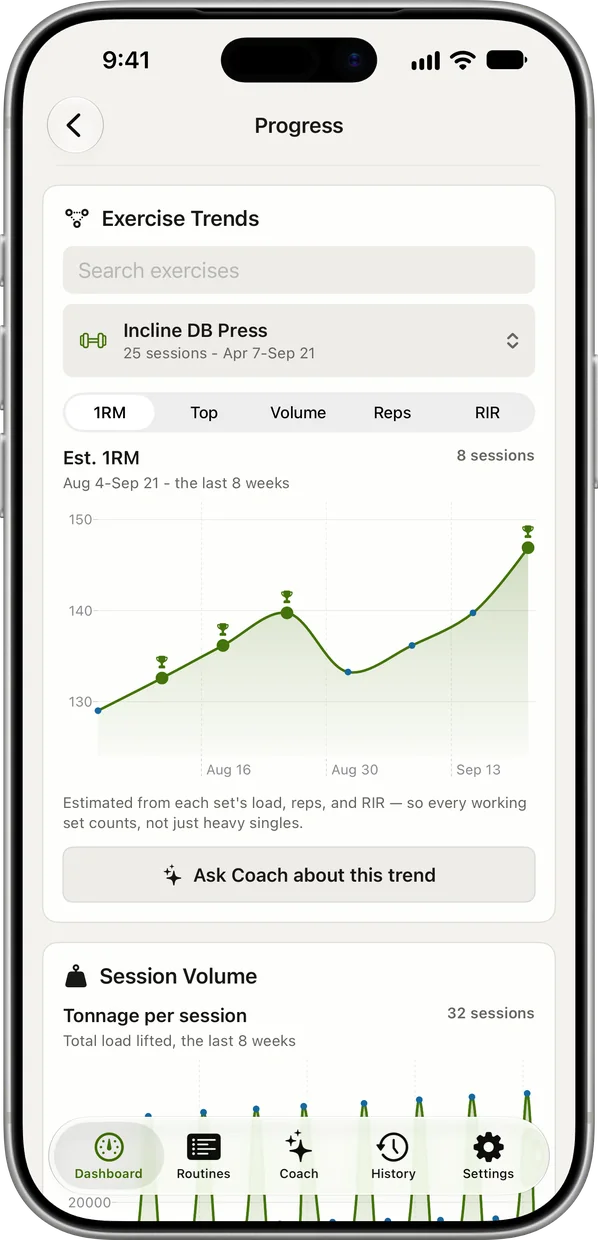
Most questions don't need a file. Progress charts every lift's estimated 1RM over time from your logged sets, on iPhone.
-
Sessions in Apple Health too
With your permission, each finished session also saves to Apple Health as a workout, free, next to your runs and rides.
-
Your history, both ways
Import is free: bring a CSV from Hevy, Strong or FitNotes, or one RIRLift exported, and the next weights start from it.
What the export answers
Your coach wants the last block
Eight weeks of upper/lower logged on the Watch. You export the CSV and send it before your check-in.
| Exercise | You logged | Next session | Why |
|---|---|---|---|
| Barbell Back Squat | Last session: 245 lb × 8 / 8 / 8, 2 left (range 5–8) | 250 lb × 5 | Three rows in the file, each with an RIR of 2 next to a target RIR of 2. Every set at the top at the planned effort, so one 5 lb step. |
| Barbell Bench Press | Last session: 190 lb × 8 / 8 / 7, 1 left (target 7, range 6–8) | 190 lb × 8 | The RIR column reads 1 against a target RIR of 2: harder than planned. The weakest set made its target of 7, so the weight holds and the target moves to 8. |
The coach sees planned effort next to real effort for every set, not just the weights.
A block review in a spreadsheet
You filter the CSV to one exercise and sort by date to see how six weeks of pulldowns moved.
| Exercise | You logged | Next session | Why |
|---|---|---|---|
| Lat Pulldown | Week 6: 140 lb × 12 / 11 / 10, 1 left (target 11, range 8–12) | 140 lb × 11 | Filtered, the load column climbs 120, 130, 140 with the reps resetting after each step. This week the weakest set missed 11, so it holds. |
| Hammer Curl | Week 6: 30 lb × 12 / 12 / 12, 1 left (range 8–12) | 35 lb × 8 | Every set at the top of the range at the planned effort. One dumbbell step, reps back to 8. |
The pattern the app follows is right there in the rows, so you can check it yourself.
Plans worth reviewing in a spreadsheet
-
The best workout routine for the days you can train
4 days a week: upper/lower
The upper/lower block in the examples.
4× a week · 68 sets a week · ~40 min
Add to RIRLiftSee the planAdd to RIRLift
Scan with your iPhone camera to add this plan.
-
The best workout plan for muscle gain, for where you are now
Past a year of lifting, gains have stalled
For checking, set by set, where a stalled lift stopped moving.
4× a week · 76 sets a week · ~50 min
Add to RIRLiftSee the planAdd to RIRLift
Scan with your iPhone camera to add this plan.
Make it fit you
-
Log reps in reserve on every set
The RIR and target RIR columns are what make the file more than a list of weights. How to use RIR shows how to rate it.
-
Write workout notes
Notes go into the export with each workout, so a bad night's sleep or a tweaked elbow travels with the numbers.
-
Ask your AI instead
With Pro you can connect Claude or ChatGPT to your RIRLift training and ask about it directly, with no file to pass around.
-
Save machines at your gym
When you've saved gyms and machines, the export adds which gym and machine each set was on.
Questions
How do I export my Apple Watch workout data?
Apple's Health app has Export All Health Data under your profile, which gives a zipped XML of everything in Health. For lifting sets, use the app you logged them in: in RIRLift, Settings › Sharing & export › Export workout history (Pro) shares a CSV.
Does the Apple Health export include my sets and reps?
A lifting session in Health is a workout with its type, time, energy and heart rate. The sets, reps and weights you log in RIRLift stay in RIRLift, which is why it exports them itself.
Can I export to Excel or Google Sheets?
Yes. The file is standard CSV with one row per set, so it opens in Excel, Google Sheets or Numbers.
Is the export free?
CSV export is a Pro feature. Logging, the Apple Watch app, saving to Apple Health and importing history from other apps are free.
Can I import the file back?
Yes. RIRLift imports its own CSV as well as files from Hevy, Strong and FitNotes, for free.
Read next
-
Connect your AI
Ask Claude or ChatGPT about your logged training.
-
How to log workouts
What's worth recording in the first place.
-
Best workout log app
How workout logs compare, export included.
-
Why logging on your wrist beats your phone between sets
Where the rows in your export come from.
More ways lifters use RIRLift
-
The workout app that puts your lifting in Apple Health
Lifting sessions saved to Apple Health exercise by exercise, next to your runs, with your next weights set.
-
The Apple Watch workout tracker that remembers every set
Weight, reps and reps in reserve for every set, tracked on your wrist and turned into next week's numbers.
-
The gym tracker that turns your logs into your next weight
Bring your old logs, chart every lift, and see a stall answered before it eats another month.