
The Apple Watch workout tracker that remembers every set
Published November 3, 2026
Apple's Workout app tracks the session: time, heart rate and calories. A lifting tracker has to track the sets: weight, reps and how many you had left, because that is what next week's numbers come from. RIRLift logs every set on your Apple Watch, saves the session to your history and Apple Health, and sets the next weight from what you logged, with the phone left in your bag.
Free on iPhone and Apple Watch · No account · Coming to Android: join the waitlist
What an Apple Watch workout tracker should record
-
Every set, three numbers
Weight, reps and reps in reserve, logged on the Watch after each set. They're prefilled from last time, so most sets are one confirm.
-
Rest that runs itself
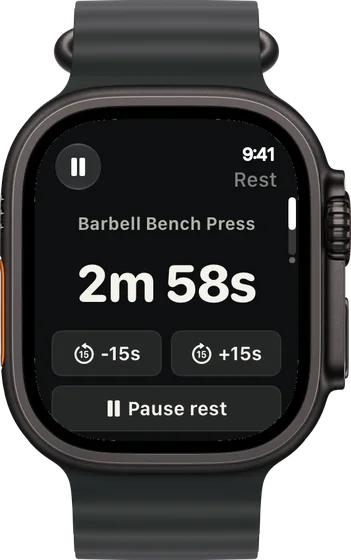
Log a set and the rest countdown starts on your wrist, with buttons to take off or add 15 seconds, then the next set is ready to go.
-
The log decides the next weight
Every set at the top of the rep range moves the weight up one step. Below that, the weight holds and the rep target climbs. The rules are in how RIRLift picks your next weight.
-
Saved without the phone
Finish on the Watch and the session is saved there and queued for your iPhone, so a locker-room phone or a dead battery loses nothing.
-
In Apple Health as strength training
With your permission, the session saves to Apple Health as Traditional Strength Training, alongside your runs and rides, with the heart rate the Watch recorded.
-
Your week, per muscle
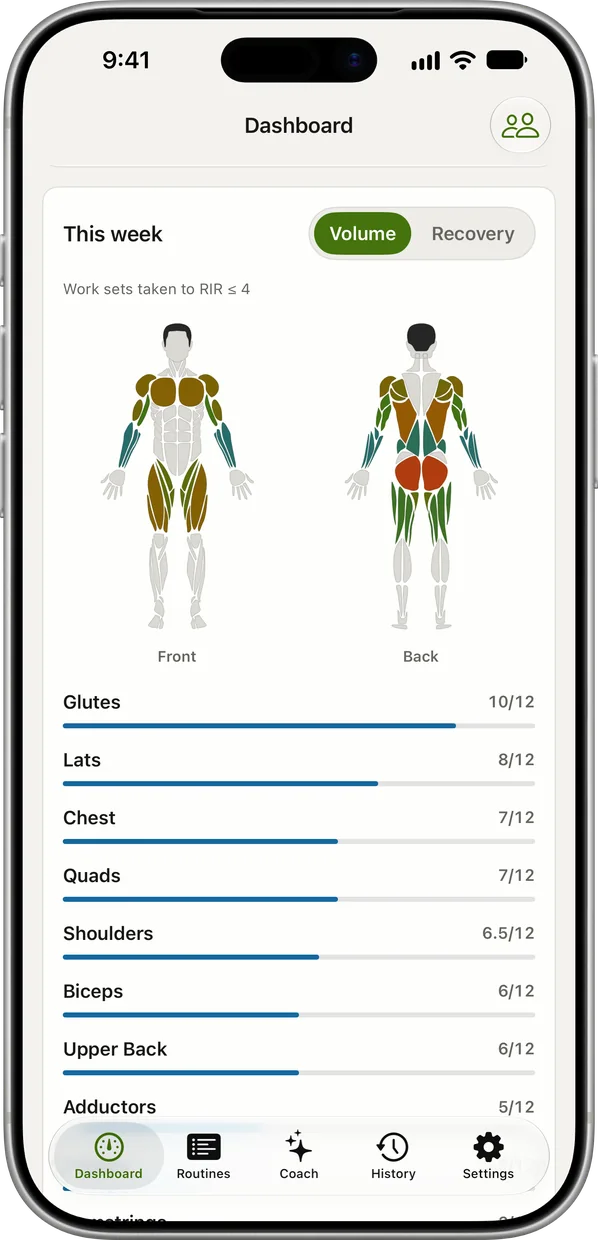
On iPhone, the weekly muscle map counts the sets each muscle got this week, so a lagging muscle shows up in the log before it shows up in the mirror.
Three weeks a tracker turned into decisions
Upper day, phone in the locker
Day 1 of a four-day upper/lower plan. You start the routine on the Watch and log each set with a tap.
| Exercise | You logged | Next session | Why |
|---|---|---|---|
| Barbell Bench Press | 185 lb, 8 / 8 / 8 reps, 2 left (range 6–8) | 190 lb × 6 | Every set reached 8, the top of the range, at the planned effort. One 5 lb step, reps back to 6. |
| Barbell Row | 155 lb, 10 / 9 / 8 reps, 2 left (target 8, range 8–10) | 155 lb × 9 | The weakest set hit today's target of 8 but not the top of the range. Same weight, one more rep. |
| Lat Pulldown | 130 lb, 12 / 12 / 12 reps, 2 left (range 10–12) | 140 lb × 10 | Top of 10–12 on every set: one step up the stack, reps back to 10. |
Next week's three numbers were set on the Watch as soon as you finished.
Week 4: the log says your back is behind
By Thursday the iPhone's muscle map shows chest well ahead of upper back. You add three sets of cable rows to Upper B and keep logging from the Watch.
| Exercise | You logged | Next session | Why |
|---|---|---|---|
| Seated Cable Row | Added: 120 lb, 12 / 11 / 10 reps, 2 left (target 10, range 10–12) | 120 lb × 11 | Its first week in the plan. The weakest set hit 10, so the target moves to 11 at the same weight. |
| Chin-Up | Bodyweight, 8 / 7 / 6 reps, 2 left (target 6) | Chin-Up × 7 | Bodyweight lifts progress by reps. The weakest set made its target. |
| Face Pull | 40 lb, 15 / 15 / 15 reps, 2 left (range 12–15) | 50 lb × 12 | Top of 12–15 on every set: one stack step, reps back to 12. |
A set count per muscle made "more back work" a decision, not a hunch, and the new sets were tracked like the rest.
Thirty minutes, arms as supersets
A short day: triceps and biceps paired. Between sets the Watch shows which exercise is next and which round you're on.
| Exercise | You logged | Next session | Why |
|---|---|---|---|
| Cable Triceps Pressdown | 50 lb, 15 / 15 / 15 reps, 1 left (range 10–15) | 60 lb × 10 | Every set at the top of the range at the planned effort. One stack step, reps back to 10. |
| Hammer Curl | 30 lb, 12 / 11 / 10 reps, 1 left (target 10, range 10–12) | 30 lb × 11 | The weakest set hit today's target of 10. Same dumbbells, one more rep. |
Alternating two exercises, each still got its own record and its own next weight.
Plans to track from your wrist
-
The best workout routine for the days you can train
4 days a week: upper/lower
The plan the first two examples follow: four days, every muscle twice a week.
4× a week · 68 sets a week · ~40 min
Add to RIRLiftSee the planAdd to RIRLift
Scan with your iPhone camera to add this plan.
-
The best workout for arms: biceps, triceps and forearms together
Short on time, arms twice a week
The supersets from the third example, for days with half an hour.
2× a week · 24 sets a week · ~15 min
Add to RIRLiftSee the planAdd to RIRLift
Scan with your iPhone camera to add this plan.
-
The best workout for full body, for your week
Full gym, 3 days: heavy, moderate, light
Three full-body days if four don't fit your week.
3× a week · 50 sets a week · ~45 min
Add to RIRLiftSee the planAdd to RIRLift
Scan with your iPhone camera to add this plan.
Make it fit you
-
Log reps in reserve honestly
It's the number that tells the app whether a set was easy or a grind. How to use RIR shows how to judge it.
-
Pair exercises in the routine
Set two exercises as a superset on iPhone and the Watch walks you through them round by round.
-
Remember machines at your gym
When a routine starts on the Watch at a gym you've saved, review its machines and turn on Remember at this gym, so each keeps its own loads.
-
Allow Apple Health once
Grant Health access on the Watch the first time it asks, and every finished session lands next to your other workouts.
Questions
Does the Apple Watch track gym workouts?
Its Workout app records the session: time, heart rate and calories. Sets, reps and weights need a lifting app. RIRLift logs them on the Watch and saves the session to Apple Health as strength training.
How do I get my Apple Watch to track my lifting?
Build a routine in RIRLift on your iPhone, or import a plan and switch to it in My Programs, then start it from the Watch and confirm each set. Weight and reps are prefilled from last time.
Does it count my reps?
You confirm reps with a tap. An opt-in beta in Settings › Labs can suggest a count on curls, overhead presses and pull-ups, which you tap to use and still confirm.
Do I need my iPhone with me?
Not during the session. Finish on the Watch and it syncs to the iPhone later. You do need an iPhone to install RIRLift, since the Watch app is its companion.
Is it free?
Yes. Unlimited workouts, the Apple Watch app, suggested weights and the weekly muscle map are free, with no account and no ads. Pro adds plates per side on the Watch.
Read next
-
Best workout app for Apple Watch
Choose by what you need to log on your wrist.
-
Why logging on your wrist beats your phone between sets
What changes when the phone stays in your bag.
-
How to log workouts
What to write down for each set, whatever you track it with.
-
The best workout routine for the days you can train
The upper/lower plan the examples follow, in full.
-
Sets per muscle group calculator
How many weekly sets to aim for, per muscle.
More ways lifters use RIRLift
-
The Apple Watch weightlifting app that runs the whole session
Log sets, rest, load plates and swap machines from your wrist, with the next weight set on the Watch.
-
The gym tracker that turns your logs into your next weight
Bring your old logs, chart every lift, and see a stall answered before it eats another month.
-
The workout app that puts your lifting in Apple Health
Lifting sessions saved to Apple Health exercise by exercise, next to your runs, with your next weights set.