
The calisthenics app for your Apple Watch
Published November 3, 2026
Apple's Workout app has no calisthenics type and doesn't log your reps. RIRLift logs every set of pull-ups, push-ups and dips on Apple Watch with how many reps you had left, sets the next rep target from it, and saves the session to Apple Health as strength training without you picking a type. When reps run out, add a backpack or a belt and the Watch logs that weight too.
Free on iPhone and Apple Watch · No account · Coming to Android: join the waitlist
What bar-and-floor training needs on the Watch
-
Reps and reps left, at the bar
Log each set's reps and how many you had left from the Watch, prefilled from last time, with the phone nowhere near the bar.
-
A next rep target, not a guess
If your weakest set hit today's target, the next one is a rep higher. If not, it holds. Bodyweight moves progress by reps until you add weight.
-
Weight when reps run out
At the top of the range, add a backpack or a belt and log it as added weight. With your bodyweight in iPhone Settings, both count as the load.
-
No workout type to choose
A session with pull-ups, push-ups or dips saves to Apple Health as Traditional Strength Training. A day of only burpees and jump squats saves as Cross Training.
-
Rest and holds on the wrist
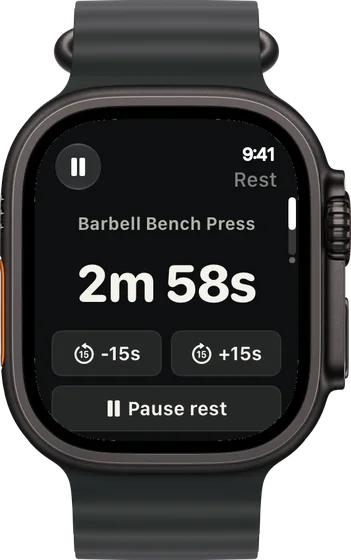
The rest countdown starts when you log, with ±15 s buttons. Timed holds run with Start hold and Stop on the Watch.
Bar-and-floor sessions logged from the Watch
A park bar, phone in the bag
Upper day outdoors: pull-ups on the bar, push-ups on the grass, dips on the parallel bars.
| Exercise | You logged | Next session | Why |
|---|---|---|---|
| Pull-Up | Bodyweight, 10 / 9 / 8 reps, 1 left (target 8) | Pull-Up × 9 | The weakest set hit 8, so the next target is 9. |
| Push-Up | 25 / 22 / 20 reps, 1 left (target 20) | Push-Up × 21 | The weakest set made today's target. One more rep next time. |
| Chest Dip | 12 / 11 / 9 reps, 1 left (target 10) | Chest Dip × 10 | The weakest set missed 10, so the target holds. |
Three movements, three rep targets, set at the bar without touching your phone.
Pull-ups top out, so you add a backpack
A few weeks on. Pull-ups have reached the top of 6–12, and your bodyweight is set in iPhone Settings.
| Exercise | You logged | Next session | Why |
|---|---|---|---|
| Pull-Up | Bodyweight, 12 / 12 / 12 reps, 1 left (range 6–12) | Add weight and log it | Every set at the top of the range. Bodyweight moves progress by reps until you add weight, and now's the time. |
| Pull-Up | +10 lb backpack, 8 / 7 / 7 reps, 1 left (target 6) | +10 lb × 8 | The weakest set made 7, past the target of 6, so the next target is 8 with the same backpack. |
| Inverted Row | 15 / 15 / 14 reps, 2 left (target 14) | Inverted Row × 15 | The weakest set hit 14. One more rep. |
The Watch logged the backpack as weight on top of your bodyweight, so the work kept counting.
The dip bars are taken
A busy gym's calisthenics corner. You replace dips with pike push-ups from the Watch and finish with a dead hang.
| Exercise | You logged | Next session | Why |
|---|---|---|---|
| Pike Push-Up | Replaced dips: 10 / 9 / 8 reps, 1 left (target 8) | Pike Push-Up × 9 | The weakest set made 8. One more rep next time. |
| Chin-Up | Bodyweight, 9 / 8 / 8 reps, 2 left (target 8) | Chin-Up × 9 | Every set made the target, so it climbs a rep. |
| Dead Hang | Target 30 s: held 32 / 30 / 25 s | 30 s × 3 | Timed holds keep the duration your routine sets. Raise it once all three holds are comfortable. |
A swap and a hold, both handled on the wrist, and the session still saved as strength training.
Calisthenics plans that open in RIRLift
-
The best workout for home, with little or no equipment
Pull-up bar and bands, 4 days
Pull-ups, push-ups and band work with a bar at home or in the park.
4× a week · 58 sets a week · ~40 min
Add to RIRLiftSee the planAdd to RIRLift
Scan with your iPhone camera to add this plan.
-
The best workout for home, with little or no equipment
No equipment, 3 days a week
No bar at all: floor, chair and stairs.
3× a week · 44 sets a week · ~35 min
Add to RIRLiftSee the planAdd to RIRLift
Scan with your iPhone camera to add this plan.
-
The best workout for upper body, for the week you actually train
Home: dumbbells and a pull-up bar
Upper body built around a pull-up bar.
2× a week · 35 sets a week · ~45 min
Add to RIRLiftSee the planAdd to RIRLift
Scan with your iPhone camera to add this plan.
Make it fit you
-
Set your bodyweight once
Enter it in iPhone Settings so pull-ups and dips count it as load and get an estimated 1RM.
-
Replace a move when the station's taken
Swap an exercise from the Watch mid-session, and it keeps its own history from then on.
-
Keep rests honest
Take 15 seconds off or add 15 on the rest screen instead of eyeballing the clock between sets.
-
Pick a range that fits the move
Set wider rep ranges for push-ups and tighter ones for pull-ups in the routine, so each tops out at the right time to add weight.
Questions
Which Apple Watch workout should I use for calisthenics?
In RIRLift you don't pick one. A session with pull-ups, push-ups or dips saves to Apple Health as Traditional Strength Training; a session of only plyometrics like burpees saves as Cross Training.
Is there a free calisthenics app for Apple Watch?
Yes. RIRLift's Watch app, rep targets and progression are free, with no account and no ads.
Does it count my reps automatically?
You confirm reps with a tap. An opt-in beta in Settings › Labs can suggest a count for pull-ups, push-ups and dips, which you tap to use.
Can I log weighted pull-ups and dips?
Yes. Log the backpack or belt as added weight. With your bodyweight set on iPhone, both count as the load.
Read next
-
Calisthenics exercises
The pulls, pushes, holds and skills worth training.
-
Pull-up bar exercises
Everything a single bar can train.
-
Pull ups
Form, your first rep and the best alternatives.
-
The best workout for home, with little or no equipment
The bar-and-bands and no-equipment plans in full.
More ways lifters use RIRLift
-
The calisthenics app for getting stronger one rep at a time
Pull-ups, push-ups and holds: rep targets that climb each week, and weighted work when reps run out.
-
The Apple Watch weightlifting app that runs the whole session
Log sets, rest, load plates and swap machines from your wrist, with the next weight set on the Watch.
-
The Apple Watch rep counter that leaves the last word to you
A rep count suggested on your wrist for curls, presses and pull-ups. You tap to use it and confirm the set.