
The progressive overload app that decides on your wrist
Published November 3, 2026
A progressive overload app for Apple Watch should change the weight on your wrist: up between sets when you had more left than planned, up next session when every set reached the top of the range, and held when you haven't earned it yet. RIRLift corrects the next set on the Watch itself, and when you finish it sets next session's weights there too, even with the phone at home.
Free on iPhone and Apple Watch · No account · Coming to Android: join the waitlist
What progressive overload needs from a Watch app
-
The next set, corrected between sets
Log weight, reps and reps in reserve. If you had more left than planned, the next set goes up right there on the Watch, marked as a correction rather than passed off as the plan.
-
Next session, decided on the Watch
Between sessions RIRLift uses double progression, judged on your weakest working set: every set at the top of the range moves the weight up one step; otherwise the rep target climbs first.
-
The phone can stay in the locker
Start, log, rest, swap and finish on the Watch alone. Next session's weights are set on the Watch when you finish, and the session syncs when your iPhone is back in range.
-
Labels that say where a weight came from
A lift you've never logged opens at a weight marked Estimate. An accepted deload shows Lighter week, and the easier week after time off shows Easing back.
-
Rest you can nudge
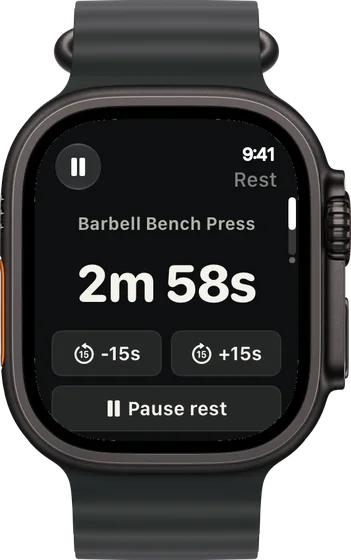
Heavy sets need longer. Take 15 seconds off or add 15 from the rest screen without touching the plan.
Progressive overload, run from the Watch
Upper day: the first bench set was too easy
A four-day upper/lower plan. Bench is set for 8 reps with 2 left, in a 6–8 range, and you've had 195 on the bar before. The phone is in your bag.
| Exercise | You logged | Next session | Why |
|---|---|---|---|
| Barbell Bench Press | Set 1: 185 lb × 8, 4 left | Set 2: 195 lb × 8 | 12 reps to failure against a target of 10: 185 × 41 ÷ 39 ≈ 194.5, rounded to 195 on the bar. |
| Barbell Bench Press | Set 2: 195 lb × 8, 2 left | Set 3: 195 lb × 8 | Exactly on plan, so the weight holds. |
| Incline Dumbbell Press | 55 lb, 9 / 8 / 8 reps, 2 left (target 8, range 8–12) | 55 lb × 9 | The weakest set hit today's target of 8. Same dumbbells, one more rep. |
The plan was ten pounds light, and the Watch fixed it before set 2, not after the session.
Upper B: three lifts, three answers
Same plan, two days later. The session finishes on the Watch, which sets the next Upper B before it syncs to the iPhone in your bag.
| Exercise | You logged | Next session | Why |
|---|---|---|---|
| Barbell Row | 155 lb, 10 / 10 / 10 reps, 2 left (range 6–10) | 160 lb × 6 | Every set at the top of the range: one 5 lb step, reps back to the bottom. |
| Lat Pulldown | 140 lb, 12 / 11 / 10 reps, 1 left (target 11, range 8–12) | 140 lb × 11 | The weakest set missed 11, so weight and target both stay. |
| Dumbbell Lateral Raise | 20 lb, 20 / 20 / 20 reps, 1 left (range 12–20) | 25 lb × 12 | Top of 12–20 on every set: one dumbbell step, reps back to 12. |
Overload is a separate decision for every lift, and the weakest set, not the best one, makes it.
A lower day with the phone at home
Monday, Watch only: squats in 5–8 with 2 left, Romanian deadlifts in 8–12. The iPhone stays at home until Wednesday's session is done.
| Exercise | You logged | Next session | Why |
|---|---|---|---|
| Barbell Back Squat | Monday: 225 lb × 8 / 8 / 8, 2 left | Wednesday: 230 lb × 5 | Every set at the top of 5–8: one 5 lb step, reps back to 5. Set on the Watch when Monday's session finished, and on your wrist for Wednesday. |
| Romanian Deadlift | Monday: 185 lb × 10 / 9 / 9, 2 left (target 9) | Wednesday: 185 lb × 10 | The weakest set hit its target: same weight, one more rep. |
| Barbell Back Squat | If you'd chosen Ask first: Monday 225 lb × 8 / 8 / 8 | 230 lb once you confirm it on iPhone | Ask first shows the raise on the iPhone recap and saves it only when you approve it. |
Keep Coach On to have each raise saved on the Watch the moment you finish; Ask first if you want to approve every change.
Plans that progress well from the Watch
-
The best workout routine for the days you can train
4 days a week: upper/lower
The plan in the first two examples: four days, each lift twice a week.
4× a week · 68 sets a week · ~40 min
Add to RIRLiftSee the planAdd to RIRLift
Scan with your iPhone camera to add this plan.
-
The best workout plan for muscle gain, for where you are now
Past a year of lifting, gains have stalled
For lifts that have stopped moving and need the stall logic.
4× a week · 76 sets a week · ~50 min
Add to RIRLiftSee the planAdd to RIRLift
Scan with your iPhone camera to add this plan.
-
The best workout for full body, for your week
Full gym, 3 days: heavy, moderate, light
Three days a week, barbell and dumbbell.
3× a week · 50 sets a week · ~45 min
Add to RIRLiftSee the planAdd to RIRLift
Scan with your iPhone camera to add this plan.
Make it fit you
-
Choose how much the Watch decides
Coach On saves each change when the session reaches your iPhone. Ask first shows each change on the iPhone recap to approve. Off shows no suggested weight at all.
-
Set the range and reps left per exercise
Each exercise in a routine has its own rep range and target reps in reserve. The Watch uses them for every correction.
-
Pick a pace
Steady takes smaller, surer steps, Standard is plain double progression, and Push takes bigger jumps.
-
Accept a deload when it's offered
After a few sessions without a new rep, the iPhone recap suggests about 10% lighter. Accept it and the Watch shows Lighter week on that lift.
Questions
Can an Apple Watch track progressive overload?
Not on its own: the Workout app records a lifting session without weights or reps. RIRLift logs weight, reps and reps in reserve per set on the Watch and sets the next weight from them.
How can I track progressive overload?
Log every working set's weight, reps and reps left, and raise the weight only when your weakest set reaches the top of the range. RIRLift makes that check after every session.
Do I need my iPhone with me?
Not during the session. Sessions run and finish on the Watch, with the next set corrected there and next session's weights set there when you finish. They sync to the iPhone later.
Do I need to test my one-rep max?
No. The next weight comes from the set you just did and the set you're aiming for. A new lift starts at a light estimate, and its first set measures you.
Is it free?
Yes. Suggested weights, corrections between sets, progression and the Apple Watch app are free, with no account. Pro adds plates per side on the Watch and Fine-tune for step sizes.
Read next
-
How RIRLift picks your next weight
Every rule the examples follow, in full.
-
The double progression method
Reps first, then load: the rule between sessions.
-
When to increase weight
The question the app answers for you, explained.
-
Progressive overload calculator
Your next weight from your weakest set, worked out by hand.
-
How to use RIR
The number that sizes each correction.
More ways lifters use RIRLift
-
The progressive overload app that decides your next weight
Next weight and rep target set from your weakest set, corrected between sets, with stalls caught early.
-
The Apple Watch weightlifting app that runs the whole session
Log sets, rest, load plates and swap machines from your wrist, with the next weight set on the Watch.
-
The Apple Watch workout tracker that remembers every set
Weight, reps and reps in reserve for every set, tracked on your wrist and turned into next week's numbers.