
Run your 5x5 from Apple Watch
Published November 3, 2026
A 5x5 app on Apple Watch should put today's bar weight on your wrist, log each set of five with a tap, and add weight when every set lands. RIRLift does that free with the phone in your bag or locker: the Watch runs the session, and when you finish, the next session's weights are decided on your wrist, even with the phone at home.
Free on iPhone and Apple Watch · No account · Coming to Android: join the waitlist
What a 5x5 needs from your wrist
-
Today's bar weight, already on the Watch
Start Workout A or B on your wrist and every set opens prefilled with the weight you earned last time. A set of five is one tap on Log, then rest.
-
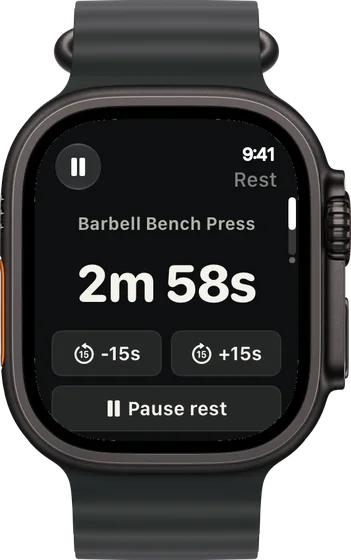
A rest timer you can stretch on heavy days
The countdown starts when you log the set. Add or take off 15 seconds from the wrist when the third set of squats needs longer.
-
Weight goes up only when all five sets land
Every set at 5: one step up on your plates next session, usually 5 lb. One set short: the weight holds. It's judged on your weakest set, which is how 5x5 is meant to run.
-
Phone in the locker
Run the whole session from the Watch with the iPhone in your bag or locker. When you finish, each lift's next weight is worked out on the Watch from your sets and waits there for the next session; the iPhone catches up when it's back in range. Set weights to Ask first if you'd rather confirm each jump on the phone.
-
Plates per side, with Pro
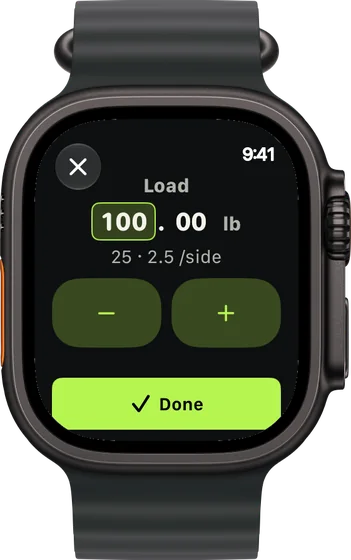
With Pro, the Watch shows what goes on each side of the bar, built from your own plates and bar. Free, it shows the weight to load.
-
Lighter weeks marked on the wrist
When a lift stalls and you accept a deload, or you come back after weeks away, the Watch labels the load Lighter week or Easing back, so a lighter bar isn't a surprise mid-session.
Three 5x5 weeks run from the Watch
A week of A, B, A with the phone in the locker
Week 3, Monday, Wednesday and Friday. Squat every session; the iPhone stays in the locker each time.
| Exercise | You logged | Next session | Why |
|---|---|---|---|
| Barbell Back Squat | Monday: 185 lb, 5 / 5 / 5 / 5 / 5, 2 left | Wednesday: 190 lb × 5 | Every set hit 5 at the planned effort: one step up, set on the Watch when Monday's session finished and waiting there when Wednesday starts. |
| Barbell Back Squat | Wednesday: 190 lb, 5 / 5 / 5 / 5 / 5, 2 left | Friday: 195 lb × 5 | Same again: one more step for Friday. |
| Barbell Row | Monday: 115 lb, 5 / 5 / 5 / 5 / 4, 1 left | Friday: 115 lb × 5 | The weakest set stopped at 4, so the weight holds for the next Workout A. |
The phone never came out of the locker during a session; each one synced once you had it back. With Ask first, 190 lb would have waited for you to confirm it in the recap on your iPhone.
Workout B, plates read off the Watch
A Pro lifter with 45, 35, 25, 10, 5 and 2.5 lb plates set up in the app. The third squat set grinds.
| Exercise | You logged | Next session | Why |
|---|---|---|---|
| Barbell Back Squat | Set 3: 200 lb × 4, nothing left (planned 5, 2 left) | Set 4: 190 lb × 5 | Four with nothing left is below 5, so the next set comes down, by at most 7%: 200 × 0.93 = 186, loaded as 190. The Watch shows a 45, a 25 and a 2.5 per side. |
| Barbell Overhead Press | 95 lb, 5 / 5 / 5 / 5 / 5, 2 left | 100 lb × 5 | Every set at 5 on plan: one step up. A 25 and a 2.5 per side. |
| Barbell Deadlift | 245 lb, 1 × 5, 2 left | 250 lb × 5 | The one work set hit 5: one step up. Two 45s, a 10 and a 2.5 per side. |
No mental math between sets. The lighter set and its plates both showed on your wrist.
Back after three weeks away
A work trip broke the program. Same Workout A, same Watch, first session back.
| Exercise | You logged | Next session | Why |
|---|---|---|---|
| Barbell Back Squat | Last session: 250 lb, 5 / 5 / 5 / 5 / 4 | 225 lb × 5, marked Easing back | The weight was holding at 250. Three weeks or more off: Ease back in opens one week about 10% lighter. 250 × 0.9 = 225. |
| Barbell Bench Press | Last session: 150 lb, 5 / 5 / 5 / 4 / 4 | 135 lb × 5, marked Easing back | Same lighter week from the held 150: 150 × 0.9 = 135. |
| Pendlay Row | Last session: 140 lb, 5 / 5 / 5 / 5 / 3 | 125 lb × 5, marked Easing back | Same lighter week, rounded to your plates: 140 × 0.9 = 126, loaded as 125. |
One easier week, then normal steps again. Choose Pick up where I left off instead if you kept lifting while away.
Plans that run as a 5x5 on the Watch
-
The best workout routine for men, for your week
Stronger squat, bench press and deadlift
Squat, bench and deadlift three days a week: the barbell lifts a 5x5 is built on, with plates per side on the wrist with Pro.
3× a week · 49 sets a week · ~55 min
Add to RIRLiftSee the planAdd to RIRLift
Scan with your iPhone camera to add this plan.
-
The best workout for beginners
Gym, three days a week
Three gym days for a first program, the same rhythm as A/B 5x5 with more variety.
3× a week · 39 sets a week · ~40 min
Add to RIRLiftSee the planAdd to RIRLift
Scan with your iPhone camera to add this plan.
-
The best workout for full body, for your week
Full gym, 3 days: heavy, moderate, light
Where to go when fives stop moving: heavy, moderate and light days, still run from the Watch.
3× a week · 50 sets a week · ~45 min
Add to RIRLiftSee the planAdd to RIRLift
Scan with your iPhone camera to add this plan.
Make it fit you
-
Build A and B once
Make Workout A (squat, bench, row) and Workout B (squat, overhead press, deadlift) as two routines on the iPhone, each lift at 5 sets of exactly 5. Both show up on the Watch, and two routines fit in the free tier's four.
-
Decide who approves the jumps
Leave weights On and each step is set for you after every session. Switch to Ask first to confirm every step in the recap on your iPhone.
-
Enter your gym's plates
With Pro, set your plates and bar, fractional plates included, so the wrist only shows loads you can build.
-
Give squats more rest
Set rest per exercise in the routine, longer for squats and deadlifts. On a hard day, tap +15 s on the Watch instead of guessing.
Questions
Is there a free 5x5 app for Apple Watch?
Yes. RIRLift's free tier includes the Apple Watch app, unlimited workouts, the weight suggestions and up to 4 active routines. A 5x5 uses two. No account and no ads.
Do I need my phone at the gym?
Not on you. Logging, rest and in-session weight changes run on the Watch with the phone in your bag or locker, and the session syncs to your iPhone afterwards. You need an iPhone to install RIRLift and build the routines.
What happens when I fail a weight?
Miss a rep and the weight holds next session. After three sessions with no new rep, the recap offers about 10% lighter. Accept it and the Watch marks those sets Lighter week.
Does the Watch show which plates to load?
With Pro, yes: plates per side, from your own plates and bar. On the free tier the Watch shows the weight, and the iPhone shows the plate breakdown.
Is 5x5 a good strength program?
For a first year of lifting, yes: three full-body sessions, heavy compound lifts and weight added whenever every set lands. When fives stall for good, GZCLP or the Texas Method are common next steps.
Read next
-
A 5x5 app that adds the weight when you earn it
How RIRLift runs a 5x5 on iPhone, deloads included.
-
GreySkull LP
A linear program with AMRAP sets, a close cousin of 5x5.
-
Beginner strength program
Choosing a first barbell program.
-
Barbell calculator
Plates per side for any weight, the same math the Watch shows with Pro.
-
How RIRLift picks your next weight
Every rule behind the numbers above.
More ways lifters use RIRLift
-
A 5x5 app that adds the weight when you earn it
Five sets of five on the big barbell lifts, with the next weight set from how every set went.
-
The Apple Watch weightlifting app that runs the whole session
Log sets, rest, load plates and swap machines from your wrist, with the next weight set on the Watch.
-
The powerlifting app for building your squat, bench and deadlift
Heavy triples adjusted set by set, plates per side worked out, and no max test to get started.